



Key Takeaways
◼️ UTM parameters translate email clicks into clean GA4 attribution, proving which campaigns, automations, and CTAs drive sales for your store.
◼️ Standardize utm_source, keep utm_medium as email, and name utm_campaign to match your promo calendar for quick, reliable reporting.
◼️ Use utm_content to compare internal links and creative variants, and utm_term to store useful product or audience context.
◼️ Set platform defaults, test links on real devices, and validate in GA4 Traffic acquisition to prevent errors and data loss.
◼️ TargetBay Email & SMS streamlines UTM implementation for campaigns and automations so your data stays consistent and scalable as you grow.
If you can’t show which emails actually drive traffic, signups, and revenue, you’re flying blind. UTM parameters are the straightforward fix.
They work behind every click to attribute traffic in GA4, so you can finally prove which email campaign, which CTA, and even which button color moves the needle for your store.
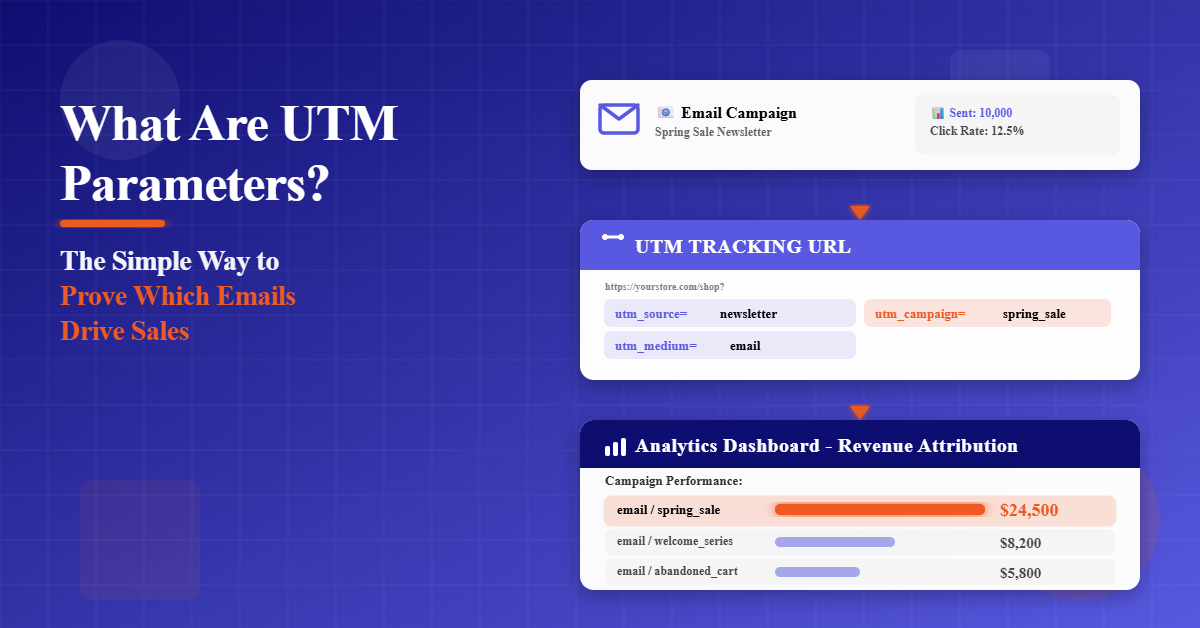
What are UTM parameters? They’re tiny tags you add to links that translate your clicks into clean, reliable email performance in Google Analytics 4.
Use them consistently, and you’ll know which campaign, audience, and piece of creative produced sales, not just opens or clicks.
What Are UTM Parameters and Why Do They Matter for Email
UTM parameters (short for Urchin Tracking Module) are query strings you append to URLs to identify where a visit came from and why.
GA4 reads these tags and attributes sessions, engaged sessions, conversion events, and revenue back to the exact email source. That means you can compare promotions, sequences, and even individual CTAs with confidence.
A simple example looks like this:
https://yourstore.com/products/hoodie?utm_source=newsletter&utm_medium=email&utm_campaign=spring_sale_2025&utm_content=hero_button&utm_term=hoodie
There are five core UTM tracking parameters.
Source identifies where the traffic originated.
Medium describes the channel.
Campaign names the initiative.
Content differentiates links inside the same email.
Term optionally captures a keyword or audience detail.
When e-commerce marketers search for what are UTM parameters in marketing or what UTM tracking parameters are, this is the foundation they are looking for.
More UTM Email Marketing Resources for You
The Core UTM Parameters to Use in Email Campaigns
In email tracking, 3 parameters are essential.
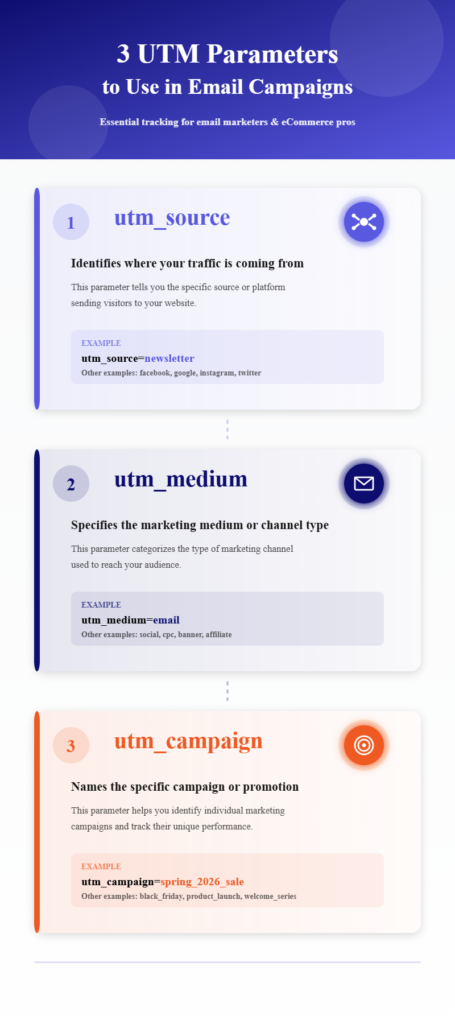
Use utm_source to name the specific program or list, such as newsletter or vip_list.
Set utm_medium to email and keep it consistent.
Name utm_campaign with a clear, readable label like spring_sale_2025 or bogo_may_week2.
Two parameters are optional but powerful.
Use utm_content to separate CTAs within a single message. Examples include hero_button, first_text_link, or footer_logo.
Use utm_term to capture extra context, such as product keyword, audience segment, or discount tier, that helps your BI or merchandising team.
You can populate these values in three ways. Static values never change across a send and are perfect for utm_medium or a specific one-off campaign.
Dynamic values pull in variables such as email ID, date, audience, or product category, which is ideal for automations and large catalogs.
Custom values let you add unique labels required by your internal reporting without disrupting GA4, such as creative_version or influencer_code appended after the standard UTMs.
How to Use UTM Parameters for Email Marketing Tracking
Every link that could lead to a session should be tagged. Add UTMs to primary buttons, text links, images, and even social icons that route to owned channels.
The goal is simple. When someone clicks, your analytics should know exactly which email asset drove the visit.
Consistency is the difference between a beautiful report and a mess. Keep naming standardized across campaigns and automations. Use lowercase. Avoid spaces. Prefer underscores or hyphens.
Keep the medium fixed as email and keep the source human-readable so your team can scan reports quickly.
Consider three email scenarios.
For a promotional blast, set utm_campaign to bfcmsale_2025 and differentiate utm_content by hero_button, secondary_button, and price_link.
For a product drop, use a campaign name like drop_jan_running_shoes and set utm_term to the product family to help merchandising find winners.
For automations like welcome, browse abandonment, or win-back, standardize conventions like welcome_day1, browse_abandonment_v1, or winback_30d, while letting utm_content capture variants such as free_shipping_banner or 10off_button.
If you’ve wondered how to use UTM parameters for email marketing tracking or searched how do I use UTM codes to track email success, the answer is consistent tagging plus disciplined naming. That’s the system that scales.
How to Implement UTM Parameters for Tracking Campaign Results
Start with the link. Build the URL with the five UTM fields set to your approved conventions.
Paste it into your email editor for every clickable element in the template. Send yourself a test email and click through on desktop and mobile.
Confirm the full URL loads, no redirects strip parameters, and your landing page behaves normally.
Open GA4 and watch in real time. Navigate to Reports, then Acquisition, then Traffic acquisition. Filter by Session campaign, Session source, or Session medium.
If you see your campaign values populate as you click from your test email, you’re set. If not, check for typos, missing parameters, or email client rewriting and try again.
Prevent manual errors by setting defaults in your email platform. In TargetBay Email & SMS, you can define UTM values at the campaign level and as global defaults.
When creating a campaign, expand the UTM tracking section, select or create your source, medium, and campaign values, and save.
To set organizational defaults so no one forgets, open Settings, select UTM tracking, and save your preferred source, medium, and naming structure. These become the baseline for all campaigns.
Automations deserve the same rigor. In TargetBay Email & SMS, open your automation workflow, choose the email action, click Edit, and toggle UTM Parameter to on.
By default, the TargetBay appends utm_source=TargetBay, utm_medium=email, and a campaign identifier such as engage-{email_id}.
You can swap to static, use dynamic variables like product category or audience segment, and add utm_content or utm_term based on your needs. Save your settings so the platform automatically tags every link that leaves your store at scale.
How to Track Email Success with UTMs in GA4
All the magic shows up in GA4 once you send. Go to Reports, then Acquisition, then Traffic acquisition to review performance by session source, medium, and campaign.
This is where you answer what UTM parameters are used for in Google Analytics and what they are in practical terms. GA4 reads your tags and organises the data, allowing you to evaluate channel and campaign performance.
Focus on metrics that matter to e-commerce. Sessions and engaged sessions show real interest.
Conversion events are tied to your actions, like add_to_cart or purchase. Revenue closes the loop so you can rank campaigns by impact, not vanity metrics.
Create comparisons between campaigns to see which promotions or automations deliver the best return.
Use content to compare internal elements like the hero button versus a text link. Send both and label them with utm_content so you can measure the winner, not guess.
If you run consistent naming, you can pivot by campaign calendar, audience, or product line in seconds. This is the real answer to UTM for email campaigns. You make your data trustworthy and your decisions faster.
More UTM Email Marketing Resources for You
UTM Best Practices and Naming Conventions
Keep everything lowercase so your reports don’t split the same value into multiple rows.
Replace spaces with hyphens or underscores to keep URLs clean and readable.
Avoid duplicating the same campaign name across different time periods.
Add a date or promo theme so historical comparisons are easy.
Keep the medium standardized as email.
Use a source that humans can read and recognize, like newsletter, vip_list, crm, or brand_email.
For campaign names, mirror your business plan. If your calendar says spring_sale_2025 week1, use that same language in utm_campaign. Your future self will thank you during quarterly reviews.
Keep utm_content short and descriptive. Think like a tester. If you run a CTA color test, use cta_green and cta_black. If you compare the hero banner to the product grid, use hero_banner and grid_tile1.
For utm_term, store keywords, audience tiers, or merchandising tags you actually report on. If a label never informs a decision, drop it.
Common Pitfalls and How to Avoid Them
Inconsistent parameters across teams and tools degrade trust. Decide your naming rules once, document them, and share the guide in your playbook.
When you migrate templates or launch new automations, confirm the same conventions apply.
Missing tags cost insight. Images, social icons, and footer links often slip through.
Audit your templates quarterly.
Click every link and verify UTM presence and correctness. Short emails deserve full tagging, too.
Avoid overly long or sensitive values. Keep everything light and safe for public URLs.
Never include personally identifiable information. Stick to marketing labels relevant to the campaign and creative.
Do not retag internal links on your site. Once a visitor lands, rely on native navigation and events.
Adding UTMs to on-site links will overwrite the original attribution and muddy your GA4 reports.
Test across devices and clients. Some email clients rewrite URLs. Send test messages to your most common inboxes and phones.
If a client strips parameters, consider shortening the base link within your domain and keep the UTMs intact at the redirect.
Advanced UTM Tips for E-commerce
Align UTMs across channels for clean multi-channel attribution. Use the same campaign names in paid social, influencer programs, and email so cross-channel comparisons are apples to apples.
If you’re wondering what UTM parameters in social media are or what TikTok UTM parameters are, the structure is identical.
Only change utm_medium to match the channel and refine utm_source for each platform or partner.
Use utm_content to track product categories, hero creatives, and A/B variants in a way your merchandising team can act on.
For example, content values like running_shoes, cozy_knits, or giftguide_top10 make it clear which segment contributed to sales.
If your BI team needs more context, append custom parameters alongside UTMs without breaking GA4.
For example, add creative_version=v3 or loyalty_tier=gold after the standard fields.
GA4 will ignore unknown parameters, while your internal systems can read them.
With TargetBay Email & SMS, you can add custom parameters that automatically append to every link sent by your campaigns and automations.
For brands layering reviews and loyalty into email, connect your content and UTMs to lifecycle triggers.
Featuring high-impact social proof collected via TargetBay Reviews or an exclusive perk from TargetBay Rewards inside a win-back sequence is more effective when your utm_content labels identify which story or perk closed the sale.
Conclusion
Strong email performance comes from clarity and consistency. When you implement UTMs the right way, you replace guesswork with proof.
You’ll know which messages and automations drive sessions, conversions, and revenue, and you’ll stop wasting time reconciling incomplete reports. Stand up a simple naming system, enforce it in your templates and automations, and validate results in GA4.
With TargetBay Email & SMS, you can set defaults, apply UTMs at the action level, and scale tagging across every campaign and sequence without manual work. That’s how e-commerce teams move from “we think” to “we know.”