



Key Takeaways
◼️ UTM troubleshooting starts with controlled tests: click in incognito, bypass wrappers, confirm parameters persist post-redirect, validate encoding, and ensure your destination never strips query strings.
◼️ Use a consistent, lowercase taxonomy for utm_source, utm_medium, and utm_campaign, and apply utm_content and utm_term when you need A/B and segment insights that map to conversion outcomes.
◼️ Automate UTM campaign tracking with account-level defaults and flow-level toggles in TargetBay Email & SMS, using dynamic, static, and custom parameters to minimize human error and scale cleanly.
◼️ Prevent dropped UTMs by whitelisting query strings, preserving parameters across cross-domain journeys, and testing mobile deep links and universal links on real devices to confirm end-to-end continuity.
◼️ Validate performance in GA4’s Traffic acquisition and Explorations, filter for medium equals email, normalize case, and run pre-send and post-send QA so email revenue is never misattributed to Direct.
Email is often your highest ROI channel, yet a shocking amount of revenue gets misattributed to Direct or Unassigned because UTMs break somewhere between the inbox and Google Analytics.
If you have ever thought, “My UTM is not working,” you are not alone.
This guide gives e-commerce email marketers a clear, practical approach to UTM troubleshooting, so your campaigns show up in GA4 accurately and consistently.
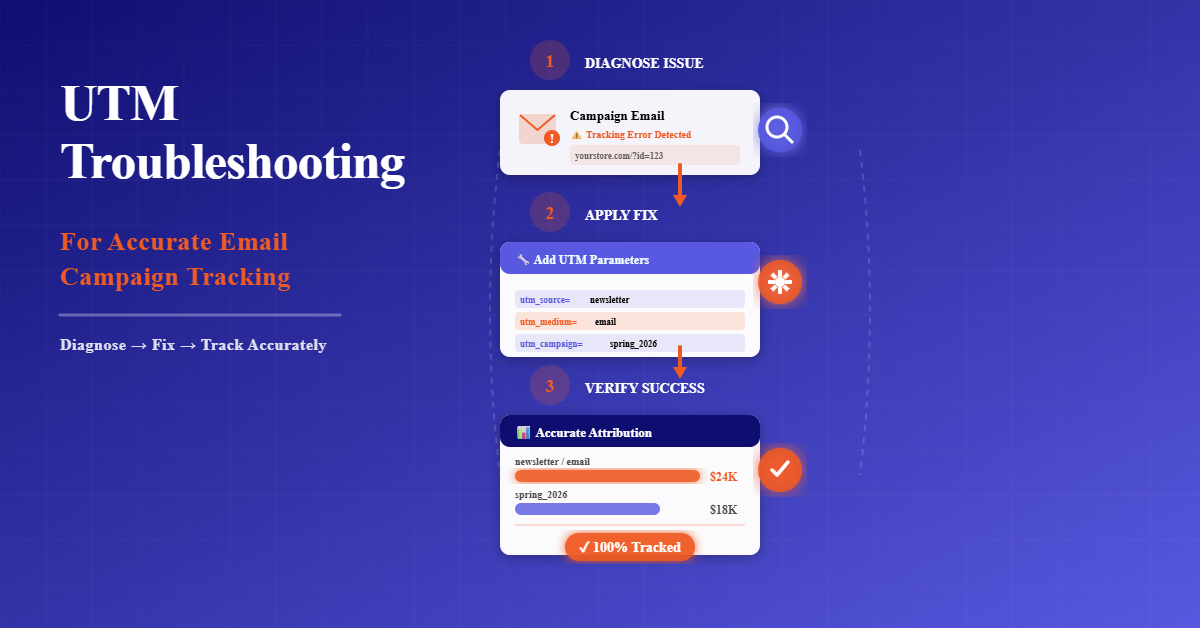
Quick Diagnosis: Why Your UTMs Look “Not Working”
Start with a fast, controlled test. Send yourself a test email, open it on a desktop, and click your CTA in an incognito window.
Watch the browser address bar to confirm the URL includes your query string after all redirects. If the parameters disappear between clicks, you have a redirect issue.
Bypass link shorteners and any custom storefront redirects to isolate the problem.
Many shorteners and link wrappers use 301s or tracking layers; those must preserve query strings.
If your ESP rewrites links for click tracking, confirm the redirect passes UTMs through untouched.
A quick way to check is to paste the final destination URL into a separate tab and confirm the parameters are present.
Validate URL encoding. Replace spaces with hyphens or underscores, and escape special characters that break URLs.
Remove anchors or fragments, the part after a hashtag, before your UTMs.
Anything following the # is not sent to the server; if you place UTMs after #, GA4 will never see them.
Verify the destination does not strip parameters. Some landing page templates, storefront redirects, or mobile app routers remove query strings for cleanliness or because of strict allowlists.
Whitelist your email UTM parameters and confirm that deep links and universal links carry UTMs across app opens.
More UTM Email Marketing Resources for You
UTM Setup Basics You Must Get Right
There are a few non-negotiables. Every email link should include utm_source, utm_medium, and utm_campaign.
These three drive GA4 UTM tracking and power your attribution and roll-up reporting.
Optional parameters include utm_content, utm_term, and utm_id, which help with A/B tests, audience segmentation, and deeper analysis.
Stick to strict naming rules. Use lowercase across the board. Do not use spaces; rely on hyphens or underscores instead. Keep a consistent taxonomy so “email” means the same thing everywhere.
GA4 treats “Email” and “email” as different values, which fragments reporting.
A clean example looks like this: ?utm_source=email&utm_medium=campaign&utm_campaign=spring-sale.
Many teams prefer utm_medium=email and reserve utm_source for the platform or list source, but the key is consistency across every send.
How to Use UTM Parameters for Email Marketing Tracking
Treat UTM campaign tracking as your operating system for analytics. Append email UTM parameters to every clickable element.
That includes hero buttons, in-line text links, navigation menus, and images. If traffic can arrive at your site from the email, it must carry UTMs.
How to Use UTM Parameters
for Email Marketing Tracking
6 Best Practices for Accurate Attribution
Tag Every Link
Add UTM parameters to all email links—buttons, images, and text links. Consistent tagging gives full coverage and accurate attribution for every click.
utm_content Variants
Differentiate links with utm_content. Use values like hero_cta, footer_link, or sidebar_banner to see which sections drive the most engagement.
Dynamic Campaign IDs
Use merge tags or variables for utm_campaign to auto‑populate campaign names (for example {{campaign_name}}) and reduce manual errors.
Static Source/Medium
Keep utm_source and utm_medium consistent. Always use email for medium and a stable ESP name for source to maintain data integrity.
Segment utm_term
Use utm_term for audience segments or keywords such as vip_customers, first_time_buyers, or cart_abandoners to gain deeper insights.
GA4 Revenue Attribution
Connect UTM data to revenue in GA4. Track conversions and ROI by campaign to prove email impact and optimize future sends based on performance.
Use utm_content to label variants, such as subject line A vs B, button text, or image-led vs copy-led layouts.
This lets you view conversions and revenue by content type in GA4, not just clicks. Reserve utm_term for segments or keyword-like values where helpful.
For e-commerce, values like high-value, winback, or first-time-buyer can clarify which audiences generate the strongest performance.
Inside TargetBay Email & SMS, you can add tracking at the campaign level or set account defaults.
You can use dynamic values for campaign names and message IDs, static values for the source and medium, and custom parameters to capture unique attributes that matter to your store.
Automation and Defaults to Prevent Human Error
Human error breaks more UTMs than technology ever will. The fix is automation.
Turn on the setting to automatically append UTM parameters for every campaign and automation.
At the account level, define defaults such as utm_source=email, utm_medium=email, and utm_campaign using dynamic tokens like campaign_name or flow_name combined with message_id. This approach ensures standardization at scale while keeping campaigns uniquely identifiable.
TargetBay Email & SMS makes this straightforward. In campaign creation, open UTM tracking and choose your values. Save them, and schedule as usual.
You can also set universal defaults under Settings so every campaign inherits consistent values unless you override them.
For automations, open your flow, edit the email step, and toggle UTM Parameter on. By default, the TargetBay appends utm_source=TargetBay, utm_medium=email, and utm_campaign=engage-{email_id}.
Choose static, dynamic, or custom to match your taxonomy. Add utm_content and utm_term when you want granular insights on creative variants or segments.
You can even add custom parameters that will be automatically included on every link in Engage emails.
Preventing UTMs from Being Dropped
Preserving UTMs across redirects and domains is non-negotiable. Confirm that all link shorteners and storefront redirects allow query strings for whitelisted parameters.
Test the full path, not just the initial click. If your site uses multiple domains or subdomains, make sure UTMs carry through cross-domain navigation.
Some analytics setups require transporting a client identifier to preserve session continuity alongside UTMs.
Coordinate with your developer to keep UTM parameters intact through all hops.
Mobile deep links and universal links require extra attention. An iOS or Android app can intercept a click and open the app, dropping query strings in the process.
Test on real devices. If UTMs do not arrive in the app, adjust your linking strategy to ensure the parameters survive the handoff or fall back to the mobile web when tracking is essential.
More UTM Email Marketing Resources for You
Reading UTM Data in GA4
To verify that GA4 UTM tracking works, open Reports, then Acquisition, then Traffic Acquisition.
Focus on the Session source/medium and the Session campaign to validate expected values like email and your campaign name.
If you have a naming mismatch, consider using Explorations to build a table that includes both source/medium and campaign with conversions and revenue.
Normalize the case in your naming convention and use filters for medium equals email.
This avoids fragmentation caused by Email, e-mail, or EMAIL variations. If traffic appears as Direct or Unassigned, retrace your steps from the diagnosis section.
Parameters dropped during redirects, unencoded characters, or misused anchors typically cause those issues.
Common UTM Errors and How to Fix Them
Common UTM Errors
and How to Fix Them
Solve the most common UTM tagging mistakes
Inconsistent Naming
Different team members use varied conventions.
- Share Naming Guide – Create a simple document defining
utm_source,utm_medium, andutm_campaign. - Train ESP Defaults – Configure automated naming in your ESP templates.
Duplicate UTM Sets
Multiple UTM parameter sets appear in the same URL.
- Keep Single Set – Use only one full set of UTMs per link.
- Remove duplicates from URLs before launching campaigns.
ESP Link Conflicts
Email platform strips or replaces existing query strings.
- Preserve Query Strings – Configure ESP to append, not overwrite, UTMs.
- Test links before sending to ensure tracking parameters survive redirects.
Security Scanner Rewrites
Firewalls or safe‑link tools modify UTM links.
- Update Allowlist – Whitelist your domains and UTM query strings.
- Work with IT to confirm scanners keep the full URL parameters.
Special Character Issues
Spaces, symbols, and anchors quietly break tracking.
- Encode & Avoid Spaces – Use URL encoding (e.g.,
%20) or hyphens. - Never place UTMs after a
#fragment in the URL.
Redirects Overwrite UTMs
301/302 redirects strip or replace tracking parameters.
- Respect Existing Params – Configure redirects to keep existing query strings.
- Test full redirect chains to confirm UTMs persist to the final page.
Inconsistent naming ruins roll-up reporting. Publish a simple naming convention document that defines utm_source, utm_medium, and utm_campaign values with examples.
Train your team and enforce it inside your ESP with defaults and templates.
Duplicate parameters can appear if both the ESP and a manual builder append UTMs.
Keep only one complete set. The order of parameters does not matter, but duplication confuses analytics and can break some redirects.
ESP link tracking or click protection layers may conflict with your parameters if they do not pass the query string to the final URL.
Confirm that the intermediate redirect preserves UTMs. If it does not, adjust the setting or disable the conflicting layer for email links.
Security scanners and safe link services sometimes rewrite URLs for threat detection.
Ensure that rewriting retains query strings. Most scanners support this, but you may need to update your allowlist or adjust link structure to accommodate their wrap.
Special characters, spacing, and anchors cause silent failures. Encode characters like ampersands inside parameter values, avoid spaces, and never place UTMs after a # fragment.
Keep your parameters clean, short, and explicit.
Auto-tagging from other channels can conflict with manual email UTMs if redirects overwrite parameters.
Use manual UTMs for email and ensure any site-level redirects respect existing query strings rather than replacing them.
Governance and QA Checklist
Create a central taxonomy sheet that defines acceptable values for utm_source, utm_medium, utm_campaign, and optional parameters.
Include case rules, separators, and examples for common campaign types such as flash sales, new arrivals, and seasonal events.
Store it where your entire marketing team can access it.
Adopt a pre-send checklist that includes link validation. In staging or test emails, click every CTA and image, confirm UTMs persist after redirects, and ensure the final landing page includes the complete query string.
For automation steps, retest when you modify templates or change link structures.
Run post-send spot checks using GA4 Real-Time within minutes of a send to confirm session counts under medium equals email.
Review final processing the next day to ensure conversions tie back to the correct campaign.
This habit catches issues early before they impact monthly reporting or attribution models.
Conclusion
Reliable attribution is not an accident. Clean email UTM parameters, consistent naming, and careful handling of redirects transform your GA4 UTM tracking from guesswork into decision-ready data.
The moment you standardize defaults, automate tagging, and validate links before and after launch, misattribution to Direct recedes, and your real email ROI becomes visible.
TargetBay Email & SMS simplifies this discipline with appendable UTMs, dynamic, static, and custom values, and automation-level defaults that keep your taxonomy consistent across campaigns and flows. If you want to go further, TargetBay Reviews and TargetBay Rewards can enrich your lifecycle strategy, but accurate UTM troubleshooting is the foundation that ensures every program gets the credit it deserves.