



Key Takeaways
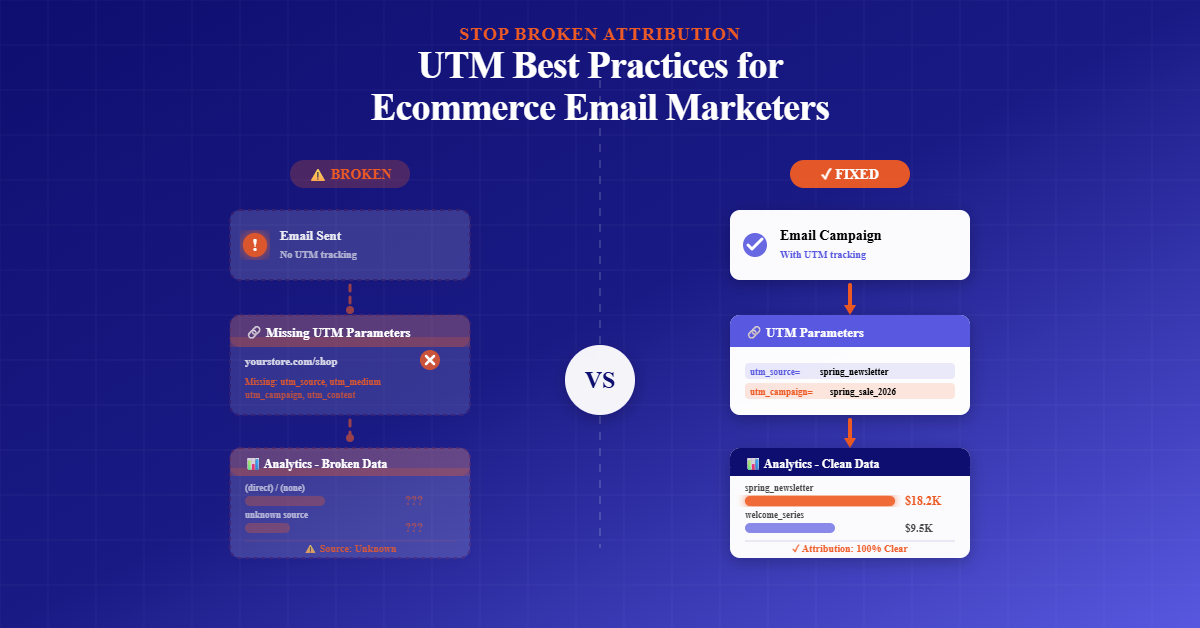
◼️ Clean, consistent UTM naming is the fastest way to stop broken attribution, align GA4 with your ESP, and see which ecommerce emails truly drive revenue across campaigns and lifecycle flows.
◼️ Use lowercase, hyphens, no spaces, set fixed taxonomies for source, medium, campaign, content, and term, and standardize mediums to match GA4 channel groupings for reliable, comparable reporting.
◼️ Auto-append UTMs to every marketing link, exclude unsubscribe and help links, prefer static mediums, use dynamic identifiers for campaigns or flow steps, and validate with end-to-end tests in GA4.
◼️ Adopt governance with a shared UTM guide, presets and templates, an approval workflow, periodic audits, and a living UTM dictionary and changelog to prevent drift as your team scales.
◼️ Leverage utm_content for creative testing, align promo codes with campaigns, use utm_id for GA4 stability, and benchmark email against SMS using consistent mediums for trustworthy cross-channel insights.
If your GA4 revenue doesn’t match your email platform, it’s rarely the algorithm’s fault.
It’s almost always inconsistent UTMs. Clean, consistent UTM best practices are the fastest path to accurate attribution, reliable reporting, and smarter ecommerce decisions.
Unstandardized naming creates duplicate channels and messy campaigns. Bad casing, spaces, or unencoded URLs break links. Tagging internal links can inflate sessions and distort conversion paths. The fix is a simple operating system for UTMs that your entire team can follow.
This guide lays out UTM parameters best practices for e-commerce email marketers, explains how to implement UTM parameters for tracking campaign results.
What UTMs Are and Why They Matter for E-commerce Email
UTM parameters are tags added to URLs so analytics platforms can attribute traffic and revenue to the right source, medium, and campaign.
In ecommerce email, UTMs tie clicks to revenue, cohorts, and lifecycle flows inside GA4, letting you compare automated flows against one-off blasts and isolate the impact of creative, offers, and timing.
When applied consistently, UTMs let you answer the questions that actually move revenue.
Which welcome-flow email produces the first purchase? Which campaign subject lines lift AOV? Which audience segment has the best 60-day LTV after a specific promotion?
Strong UTM tracking best practices turn guesswork into proof.
More UTM Email Marketing Resources for You
UTM Naming Conventions That Scale
Most data problems come from naming, not tracking. UTM naming best practices are simple.
Use all lowercase to prevent duplicates. Replace spaces with hyphens for readability.
Never include special characters that might break links or tracking. Keep names short, human-readable, and repeatable.
Choose fixed taxonomies for every parameter. For utm_source, use the platform or domain sending the traffic.
For ecommerce email, use your ESP name consistently; with TargetBay Email & SMS, a common pattern is targetbay.
For utm_medium, follow Google UTM best practices and use email for campaigns and automation for lifecycle flows if you want a dedicated rollup, or continue using email for both and distinguish flows in campaign names.
For utm_campaign, create a predictable structure that includes launch type and theme, such as 2025-03-bfcm-flash or 2025-04-welcome-step1.
For utm_content, capture creative or test variants, like hero-a-vs-b, subject-free-shipping, or discount-20-off.
For utm_term, reserve it for keyword-level details or audience attributes if required; in email, it’s optional but useful for segmentation tags such as vip, new-subscriber, or repeat-buyer.
Establishing these utm_source best practices and utm_campaign best practices prevents duplicates like Email, email, and eMail from appearing as separate channels.
It also avoids cryptic strings that nobody remembers three months later.
Required Versus Optional Parameters
Not every parameter is created equal. Three are mandatory if you want reliable attribution: utm_source to identify where the click came from, utm_medium to group traffic into channels, and utm_campaign to name the initiative or flow.
Two are optional but high leverage. Use utm_content to track A/B tests, creative elements, placements, or offers, so you can roll up winners across sends.
Use utm_term when you need keyword-level precision or audience descriptors to slice performance deeper.
The essence of UTM code best practices is clarity with restraint. Track what you’ll actually analyze, and avoid noisy, one-off tags that never get reused.
Implementing UTMs in Email Campaigns and Automations
Start by defining your schema in writing. Document the allowed values and examples for every parameter before you send a single email.
Then operationalize the plan inside your ESP so humans don’t need to remember the rules every time.
In TargetBay Email & SMS, you can set account-level defaults for source, medium, and campaign to auto-append UTMs to every link.
Within campaign creation, select or create the values you’ve approved and save them so future sends reuse the same normalized options.
For automations, toggling the UTM Parameter inside each workflow will automatically apply defaults.
By default, the TargetBay appends utm_source=targetbay, utm_medium=email, and utm_campaign=engage-{email_id}, which you can set to static, dynamic, or custom values that match your naming schema.
Dynamic values are ideal when a parameter should adapt to a campaign or node identifier, like using the campaign name token or step number in a flow.
Static values work best for utm_source and utm_medium, so your channel rollups never change. Custom values help when you need additional parameters for internal BI mapping, or when you use utm_id as a canonical campaign ID in GA4.
Always auto-append UTMs to every marketing link and exclude links that should never create sessions.
Unsubscribe, help center, preference center, account login, and mailto links should not be tagged.
This single rule removes a surprising amount of noise and prevents GA4 paths from showing “Unsubscribe” as a touchpoint in conversions.
If you are wondering how to implement UTM parameters for tracking campaign results, the workflow is straightforward.
Define your schema with examples, set defaults in TargetBay Email & SMS, choose dynamic values for identifiers, turn on the auto-append for campaigns and automations, exclude non-marketing links, and validate a test send in GA4’s real-time view before launch.
Channel Standards for GA4
GA4’s default channel groups rely heavily on utm_medium and sometimes utm_source. For clean email attribution, use email as the medium.
For SMS, use sms. For paid ads, use cpc, paid_social, or display according to your standards.
Avoid inventing mediums like newsletter or flow that GA4 won’t recognize unless you create custom channel groupings.
utm_id deserves special attention. GA4 supports utm_id as a stable campaign identifier, which helps deduplicate similarly named campaigns and strengthens cross-tool reconciliation.
If you use utm_id, set it to a unique, system-generated ID and continue using readable utm_campaign names for reporting.
Map your UTMs in GA4 exploration reports so you can pivot by source, medium, campaign, and content. If your GA4 reports don’t match your ESP, check three places first: inconsistent casing or misspellings in utm_medium, missing UTMs on key links, and untagged redirects or link shorteners that strip parameters.
More UTM Email Marketing Resources for You
Do’s and Don’ts to Protect Data Quality
Never tag internal links. UTMs are for external traffic acquisition, not on-site navigation.
Tagging internal links creates new sessions, inflates direct or email traffic, and pollutes conversion paths, making multi-touch reports unreliable.
Avoid any personally identifiable information in UTMs. Do not pass emails, names, phone numbers, or order IDs in query strings.
Keep UTMs purely about marketing context. Ensure every URL is properly encoded. Replace spaces with hyphens in the UTM values themselves and confirm that special characters in base URLs are encoded.
Test for redirects, link shorteners, and email client rewrites that may strip or duplicate parameters. Send yourself test emails, click through various clients, and confirm the final landing URL retains all UTMs in the browser.
Small hygiene rules prevent broken links. Stick to lowercase, no spaces, hyphens instead of underscores, and short, readable slugs.
These choices cut 90 percent of edge cases before they happen.
QA and Governance That Teams Actually Use
A UTM system fails when only one person knows the rules. Create a one-page UTM guide with your approved values, examples, and when to use dynamic versus static parameters.
Add an approval step to your campaign checklist where someone validates the final URLs in a test send.
Schedule periodic audits to surface drift, like a teammate using Email as a medium or a campaign name with spaces.
Maintain a UTM dictionary and changelog so new team members can see historical conventions and learn what changed and why.
If you run loyalty or referral programs through TargetBay Rewards or build social proof with TargetBay Reviews, include those flows in your dictionary with consistent source and medium pairs to unify reporting.
Governance is a lightweight operating procedure that makes reports accurate without heroic cleanup.
Optimization with UTMs Once the Basics Are Locked
After your taxonomy is stable, use UTMs to answer growth questions. Compare flows versus campaigns by rolling up utm_campaign names that start with welcome, post-purchase, or winback.
Analyze creative and placement with utm_content, then standardize the labels so you can combine results across sends and months.
Align promo codes with campaign names to reduce confusion in finance and BI. Use utm_term sparingly to capture audience or keyword-like intent for deeper segmentation.
Benchmark cross-channel performance by standardizing mediums, so email versus sms comparisons reflect true differences in engagement and conversion, not naming inconsistencies.
With clean UTM tagging best practices, you can trust cohort views, attribution windows, and contribution to revenue with confidence.
Conclusion
Attribution breaks when naming breaks. A simple, shared system for UTMs restores trust in your numbers, lets GA4 and your ESP tell the same story, and reveals which emails truly drive revenue.
TargetBay Email & SMS helps enforce your rules at scale with account-level defaults, dynamic or static parameters, auto-append on every link, and automation-ready toggles, so every campaign and flow ships with clean tracking by design.