


Key Takeaways
◼️ Email UTM parameters transform clicks into revenue insights by standardizing source, medium, campaign, and content, making channel and element-level performance easy to read in GA4 without manual guesswork.
◼️ Keep medium fixed as “email,” standardize lowercase naming, and define clear campaign formats so reports remain clean and trustworthy across newsletters, automations, and ongoing lifecycle flows.
◼️ Differentiate CTAs with utm_content to compare hero buttons, text links, and product recommendations, then roll those learnings into subject lines, offers, and audience-targeting to improve conversion rate and AOV.
◼️ Automate tagging in TargetBay Email & SMS with account-level defaults and automation toggles, handle existing query strings correctly, and URL-encode values to prevent broken links and lost attribution.
◼️ QA every send by validating parameters in your browser and GA4 Realtime, spot-check redirects and shorteners, and verify cross-domain tracking so no email-driven revenue falls through the cracks.
If you can’t tie revenue to specific emails or automations, you’re burning time and budget.
The fix is simple and powerful: a consistent, automated approach to Email UTM parameters that connects every click to sales.
E-commerce marketers often battle messy reports, inconsistent naming, and links that break when query strings are added. The result is wrong attribution in analytics and no way to compare CTAs within the same email.
This guide shows exactly how to use UTM parameters for email marketing tracking, how to implement UTM parameters for tracking campaign results without breaking links, and how to read clean, usable data that directly informs revenue decisions.
What are UTM parameters and Why do They Matter for Email
UTM parameters are short tags added to your links to tell analytics tools where traffic came from and why.
When someone clicks a tagged link in your email, UTMs allow you to connect that click to sessions, conversions, and revenue on your site, making UTM email tracking reliable and repeatable.
The core fields are simple. utm_source identifies where the traffic originated. utm_medium describes the channel. utm_campaign groups related sends under a single initiative.
utm_content differentiates links and tests inside the same email. utm_term is an optional label you can use for product, keyword, or audience segment. If you’ve ever wondered “what are the UTM parameters,” those are the five you need.
When these fields are consistent, you can see email-driven sessions, engaged sessions, conversion rate, revenue, and AOV in GA4 without guesswork.
A clean email marketing UTM parameters setup enables true campaign vs. automation comparisons and even element-level analysis like hero image vs. button performance.
A simple example looks like this:
https://www.yoursite.com?utm_source=newsletter&utm_medium=email&utm_campaign=summer_sale
More UTM Email Marketing Resources for You
The Essential UTM Setup for Email Marketing
A practical baseline works for most e-commerce teams. Use your chosen source to distinguish newsletters from automations or use your ESP name if you prefer.
Keep the medium fixed as an email to avoid channel fragmentation. Name the campaign after the promo or flow.
Use content to label the specific link or test. Leave the term for the optional product or audience details you want to analyze later.
For example, set utm_source to newsletter for broadcasts or automation for flows. Use utm_medium as email, always.
For utm_campaign, choose a format like 2025-01_new-year-sale, spring_clearance, or post-purchase_day-3.
In utm_content, use values such as cta_button_a, hero_image, footer_link, or subject_test_a to compare engagement and revenue by element.
Keep utm_term as a flexible field for product families, keywords, or segments like denim, gift-buyers, or vip.
Dynamic, static, and custom parameters each have a role. Dynamic parameters pull values from your email platform, such as the campaign name or email ID, which helps scale across automations.
Static parameters hold fixed strings like utm_medium=email to protect channel consistency.
Custom parameters extend beyond UTMs if you need extra fields, such as a creative_id, provided your analytics setup supports them.
In TargetBay Email & SMS, you can choose dynamic, static, or custom values per parameter, and even set account-level defaults, ensuring your tags are always added correctly without manual work.
Naming Conventions that Keep Reports Clean
Clean data starts with predictable naming. Use lowercase for every value. Choose hyphens or underscores and avoid spaces to prevent URL encoding oddities and analytics mismatches.
A single inconsistent capitalization, email vs. Email, splits reports and hides the truth.
Standardize a controlled vocabulary for utm_source and utm_medium and lock it down. Keep utm_medium as email, not newsletter, to maintain channel integrity in GA4.
Decide on a clear campaign format like YYYY-MM_promo-name for broadcasts or flow-name_step for automations. Formats such as 2025-02_flash-sale or welcome-series_step-2 are easy to filter and compare.
Never include personal data in UTMs. Avoid patterns like utm_email address or utm contact email because these are considered PII.
If you must pass user-level identifiers, consult your legal team and use anonymous, compliant IDs. In most cases, UTMs should describe the marketing, not the person.
Implementation Checklist (Campaigns and Automations)
Set account-level defaults so your emails carry correct tags even when your team is moving fast.
In TargetBay Email & SMS campaign creation, enable UTM tracking and choose values for source, medium, and campaign.
You can save these values as defaults in Settings, so they auto-apply to future sends, minimizing manual tagging and human error.
Ensure your platform auto-appends UTMs to all links in emails while excluding unsubscribe, preference, and support links.
Within each email, give every CTA a distinctive utm_content so you can see which link actually drove conversions.
Reuse source, medium, and campaign values across all links in the email to keep attribution consistent.
Handle existing query strings correctly so you don’t break links.
If your base URL already has a question mark, append additional parameters with an ampersand. If it doesn’t, start with a question mark.
Always URL-encode values to avoid spaces and special character issues.
A clean example is /product/blue-jeans?size=32&color=dark&utm_source=newsletter&utm_medium=email&utm_campaign=2025-03_spring-denim&utm_content=hero_cta
Apply the same rules across broadcasts and automated flows.
In TargetBay automations, toggle on the UTM Parameter inside the email action. By default, the TargetBay appends utm_source=TargetBay, utm_medium=email, and utm_campaign=engage-{email_id}, which are dynamic and safe starting points.
You can override defaults to match your naming conventions, add utm_content and utm_term for deeper analysis, and even create custom parameters that automatically attach to every link.
QA & Testing your UTM Links
Before sending to your full list, click every link in your test email and verify parameters appear in your browser URL.
Confirm the correct question marks and ampersands, and make sure values are exactly as intended with lowercase and the right separators.
Open GA4’s Realtime report while clicking and check that source, medium, and campaign show as expected.
Then, validate in Traffic Acquisition to confirm sessions and engaged sessions roll up under the correct channel grouping and campaign.
If you use cross-domain measurement, test a journey across your primary domain and checkout domain to ensure UTMs aren’t stripped, and session attribution remains consistent.
If you rely on link shorteners, partner redirects, or app links, spot-check that they preserve the query string.
Some redirects drop UTMs, which silently breaks attribution. Fix or bypass those links so your email data remains intact.
More UTM Email Marketing Resources for You
Reading Results: From Clicks to Revenue
With a solid UTM foundation, reading results becomes straightforward.
In GA4, start with Traffic Acquisition to measure sessions, engaged sessions, engaged rate, conversion rate, and revenue by source, medium, and campaign.
Use User Acquisition for first-touch attribution when you want to understand who the first email brought in.
Build Explorations to compare campaigns versus automations and evaluate which utm_content drove higher AOV or more transactions. This is where the magic happens for optimization.
Keep source and medium static, then compare campaigns side by side to identify which offers, creative angles, or holidays move product.
Within a single email, evaluate utm_content rows—hero_cta versus text_link or product-recs—to learn which elements nudge shoppers to buy.
Tie these findings back to subject lines, discount frameworks, creative, and audience segments to sharpen your strategy.
If you run a post-purchase series, use utm_campaign and utm_content to see which step drives repeat orders and whether VIP segments respond differently.
If you pair your messaging with social proof from TargetBay Reviews or use perks through TargetBay Rewards, label those sends clearly in the campaign name or content so you can quantify their impact on conversion rate and lifetime value.
Common Mistakes to Avoid
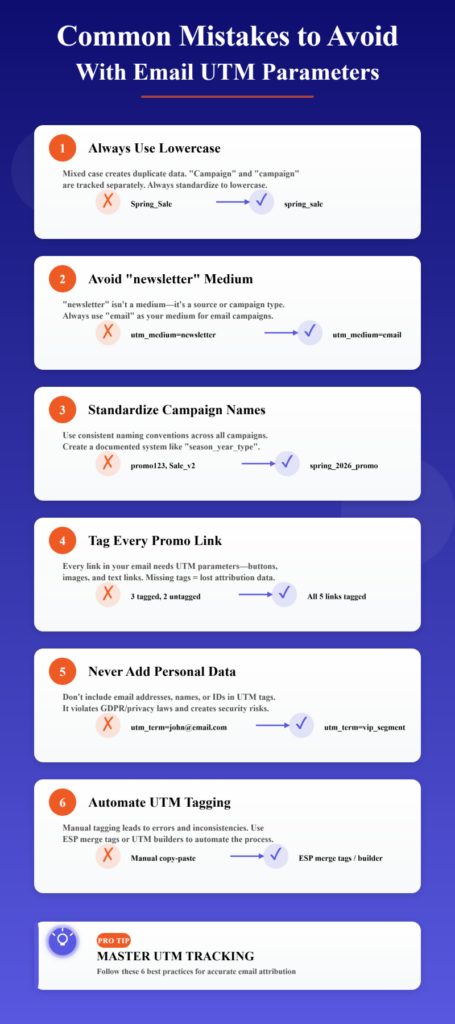
Case mismatches like utm_medium=Email versus utm_medium=email fracture your reports and inflate the time you spend interpreting them. Keep everything lowercase and consistent.
Using utm_medium=newsletter pushes email traffic out of the Email channel group in GA4. Keep medium as email and use utm_source to split newsletters from automations, or use your ESP name only if it’s part of your convention.
Inconsistent campaign naming across sends blocks makes useful comparisons. Decide on a format and enforce it so 2025-04_spring-clearance is always spelt the same way and not mixed with Spring_Clearance or springclearance.
Leaving UTMs off hero images, buttons, or secondary links kills your visibility. Auto-append UTMs to every promotional link, then change utm_content for each unique element to enable clean link-level analysis.
Including personal data like an email address in a parameter violates privacy principles and may breach policy. Keep UTMs descriptive of the marketing, not the person.
Relying on manual tagging creates gaps, especially in automations. Use your platform’s default and automated tagging so every link, in every send, is tracked consistently.
Copy-paste Templates & Examples
Here is a simple campaign template you can adapt immediately:
https://www.yoursite.com?utm_source=newsletter&utm_medium=email&utm_campaign=2025-01_new-year-sale&utm_content=hero_cta
For automations, a clean structure might look like this:
utm_source=automation&utm_medium=email&utm_campaign=post-purchase_day-3&utm_content=product-recs
Use content values that describe the element and test variant clearly. For example, subject_test_a, cta_button_b, hero_image, footer_link, or product-grid_top. Keep everything lowercase, use hyphens or underscores, and never include spaces.
Conclusion
Reliable attribution is not a nice-to-have; it’s the foundation of profitable lifecycle marketing.
With a disciplined approach to Email UTM parameters, your team can stop arguing with reports and start scaling what actually drives revenue.
TargetBay Email & SMS makes this painless by auto-appending UTMs in both campaigns and automations, letting you choose dynamic, static, and custom values, and saving account-level defaults so nothing slips through the cracks. Pair those insights with social proof from TargetBay Reviews or loyalty triggers from TargetBay Rewards when appropriate, and your email program becomes a predictable growth engine.