



⭐ Quick Summary
⚡ Faster, cleaner production: Standardized, mobile-responsive email templates speed production, improve rendering, and keep branding consistent, letting lean teams ship more campaigns with less effort while reducing costly QA fixes and inconsistencies.
📚 Template discovery at scale: A rich email template library categorized by type, season, and industry helps marketers find the right starting point quickly, so they can focus on offer, merchandising, and copy rather than layout decisions.
🧱 No-code email building: A drag and drop email editor with reusable content blocks and an integrated product widget empowers non-developers to build dynamic e-commerce emails that showcase inventory accurately and convert.
🔁 Repeatable workflows: Workflow features like test sends, HTML downloads, save and duplicate, renaming, and versioning reduce approval friction and help teams build repeatable playbooks based on proven winners.
🚀 Execution powered by AI: TargetBay Email & SMS brings these advantages together with responsive templates, product blocks, and an AI email agent, helping e-commerce brands ship better, faster, and grow revenue with far less manual work.
If your team still designs every message from a blank canvas, the cost is speed, consistency, and revenue.
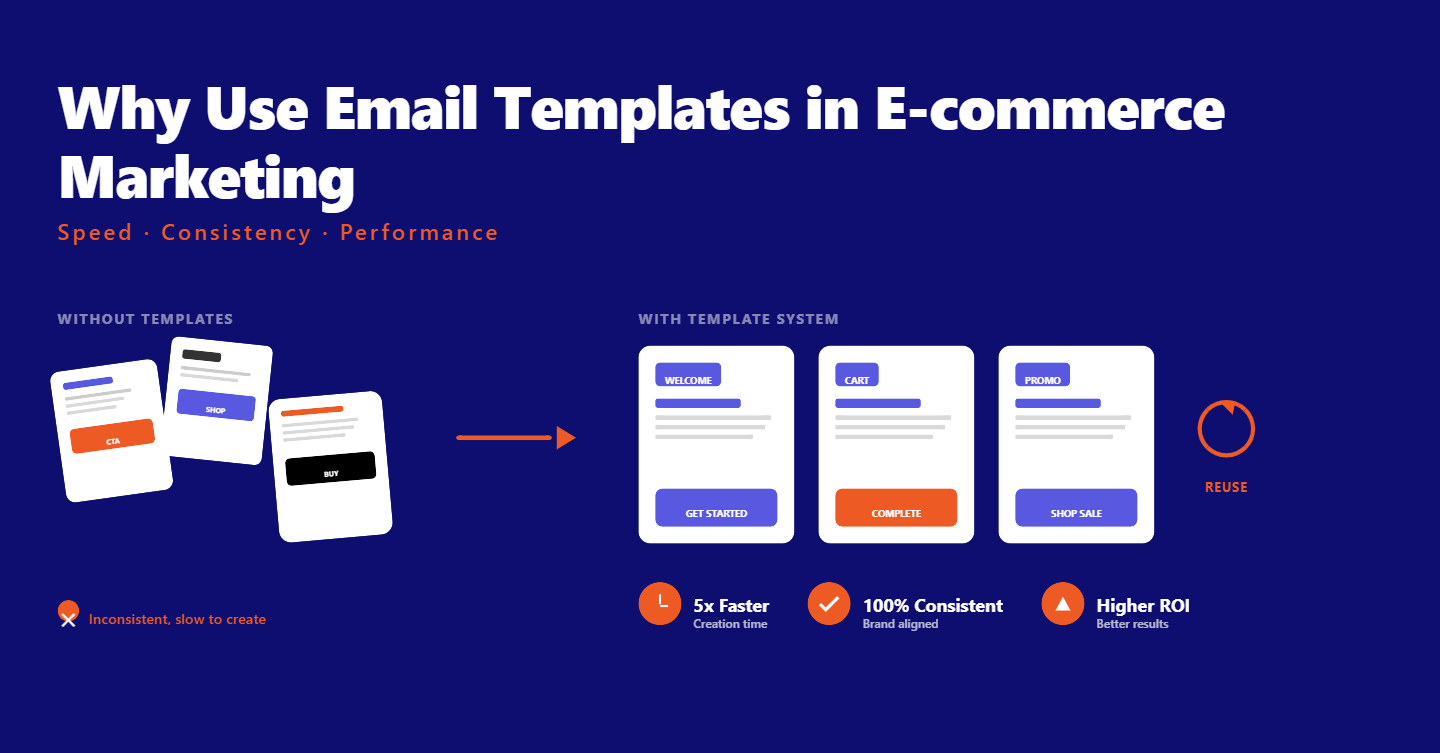
The real answer to why use email templates is simple: they remove repetitive work so you can ship high-performing campaigns faster and at scale.
For e‑commerce marketers, templates are a system that safeguards brand standards, ensures mobile rendering, accelerates QA, and gives you repeatable layouts that spotlight products and drive sales.
The benefits of email templates compound with every send, turning your email program into a reliable revenue machine instead of a creative bottleneck.
Save Time and Scale Output
Creating each campaign from scratch burdens already lean teams.
An email template library gives you dozens or hundreds of proven starting points, so you can build and launch in minutes, not hours.
The strongest libraries are organized by type, season, and industry.
Need a back-to-school promo, a spring clearance, or a post-purchase flow for beauty?
Filter by category, skim the options, and start from a layout that’s already close to your use case.
Search makes it faster still, especially when you know the format you need, like a two-column feature grid or a hero‑driven flash sale.
This is exactly why email templates are important for small teams.
Standardized structures let you scale to more sends without multiplying effort, and seasonal templates help you seize timely opportunities without reinventing the design each time.
More Email Template Resources for You
Protect Brand Consistency and Render Well Everywhere
Shaky rendering and inconsistent branding are common culprits behind low engagement.
Mobile-responsive email templates solve both problems by delivering pretested layouts that look good on every major device and client.
With a quality editor, you can lock in brand elements once and reuse them forever.
Preheaders, fonts, color tokens, spacing, alignment, and link styles become part of your master template, reducing the risk of off-brand choices when deadlines loom.
Desktop and mobile previews help you catch issues before they go out the door, ending the last‑minute scramble to fix text wrapping or squished images.
This consistency lifts trust, reduces cognitive friction, and keeps your focus on merchandising and messaging that moves inventory.
Drive More Sales with Smarter Content
Templates are a foundation. The right drag-and-drop email editor gives you a modern content toolkit so you can tailor every send to your offer and audience.
Look for flexible blocks you can place anywhere: images, headings, text, menus, dividers, buttons, videos, and social links.
Reuse your high‑performing hero module, swap in new photography, and fine‑tune your CTAs without touching code.
You get the freedom of custom creative with the safety net of pre‑tested modules that behave well on mobile.
For e‑commerce, the product block in emails is a game-changer.
A product widget that pulls your catalog directly from your store lets you merchandise dynamically.
Connect your integration, drag the block into your layout, and search for items by title, SKU, or product ID.
Populate a best‑sellers strip, a “recently viewed” carousel, or a category spotlight and keep inventory accurate without manual copying.
The payoff is immediate: faster production, fewer errors, and better merchandising tailored to the customer journey.
Design Without Developers
You shouldn’t need to know HTML to ship beautiful, reliable campaigns.
A modern drag-and-drop email editor removes the dependency on designers and developers, while still accommodating advanced needs.
If and when you need custom touches, an HTML block keeps you covered.
Embed a special countdown, custom animation fallback, or a unique module while still leaning on the stability of your master template.
For creative variety, integrated stock libraries give you access to millions of images inside the editor, cutting the back‑and‑forth for visual assets and helping you move from concept to ready‑to‑send in one sitting.
This is the core of the benefits of email templates: the blend of speed for routine tasks with flexibility for distinctive brand moments.
Streamline Workflow and QA
Shipping reliably at scale demands a tidy workflow. Templates help you enforce it.
Once your design is set, send test emails to stakeholders and devices you trust.
Download the HTML if you need to archive a version or pass it to a teammate.
Save, rename, and duplicate your best performers so you can build a playbook over time.
Versioning gives your team a single source of truth, eliminating the “final_final_v7” chaos and preserving learnings across campaigns.
When everything looks right, turn the template directly into a campaign.
This handoff reduces production friction and ensures that what you previewed is exactly what gets sent. The result is a faster QA cycle and fewer surprises in the inbox.
Quick Start: How to Get Going in Your ESP
Open your ESP and head to the Email Templates section. Browse the library, then filter by type, season, or industry to narrow to the most relevant starting points.
Use search to pinpoint the format you want, then preview templates on desktop and mobile to evaluate structure, hierarchy, and visual fit.
When you find a winner, choose it and jump into the editor. Edit content blocks and body settings to apply your brand.
Set your preheader, fonts, colors, link styles, and content width, then add images or videos as needed.
If your store is connected, drag in the product widget and add items by title, SKU, or ID so your merchandising stays synchronized.
Send a test to stakeholders, confirm rendering and accessibility, and revise as needed.
Save and rename the template in your “My Templates” area so it’s easy to find.
When you’re satisfied, launch your campaign directly from the template to avoid unnecessary duplication.
Best Practices for E‑commerce Email Templates
Start with the right strategic hook for your audience. Customize the headline to match their intent, swap imagery for seasonality or segment, and align CTA language with the desired action on that specific send.
Think mobile‑first. Use succinct headlines, generous tap targets, and comfortable spacing to prevent accidental taps.
Include alt text on images and maintain sufficient color contrast so your content is readable and accessible in any environment.
Build reusable blocks for headers, footers, and favorite promo modules to speed up assembly.
Standardize naming conventions for templates and versions so your team can find, duplicate, and adapt winners quickly for new campaigns and flows.
More Email Template Resources for You
Why Use Templates: A Familiar Analogy
You might also be asking why use templates in Excel or why use templates in Word.
The reasoning is the same as it is for email: templates standardize structure, reduce repetitive setup, and prevent formatting errors.
The difference is that email adds complexity with responsive design and client quirks.
That’s why mobile-responsive email templates, pretested content blocks, and robust previews matter.
They bring the predictability you expect from document templates into the realities of the inbox.
Conclusion
The case for using email templates is about reclaiming time and multiplying output without sacrificing quality.
You gain speed from a robust email template library, protect brand integrity with tested layouts, and drive more revenue by focusing your effort on content and merchandising instead of code.
If you want a platform that leans into this philosophy, TargetBay Email & SMS gives e‑commerce marketers a drag‑and‑drop workflow, responsive templates, a product block for dynamic feeds, and even an AI email agent to accelerate campaign creation.
Tie your email program to social proof and loyalty by pairing with TargetBay Reviews and TargetBay Rewards when appropriate, and build a lifecycle that converts first‑time shoppers into repeat buyers.