



⭐ Quick Summary
🎯 Goal-aligned templates: Choosing the right template type for your goal and funnel stage is the quickest way to boost ecommerce revenue without redesigning every email from scratch.
📱 Proven HTML structures: HTML templates with mobile-first, single-column structures and clear hero-plus-grid patterns consistently render well and focus attention on high-intent CTAs.
🧩 Scalable product personalization: Dynamic product widgets that pull titles, images, prices, and URLs from your store make recommendations scalable, relevant, and fast to build.
✅ QA before every send: A tight QA workflow—preview, test, version, download HTML, and validate merge tags—prevents costly mistakes and keeps branding consistent across campaigns.
⚡ Faster execution at scale: TargetBay Email & SMS accelerates execution with 300+ templates, drag-and-drop editing, and data-driven blocks, helping ecommerce teams ship more campaigns that convert.
The fastest way to lift ecommerce revenue isn’t a brand-new tactic. Choosing the right type of email template for your campaign.
Picking the wrong layout wastes time, breaks your branding on mobile, and buries your CTA. Choosing well turns your next send into a mini landing page that sells.
This guide walks through the types of email templates that win in ecommerce, how to match them to goals, what formats render best, and a practical workflow to preview, test, and launch quickly, without designing from scratch.
What Is an Email Template and Why E-commerce Relies on Them
An email template is a reusable layout and content structure you can customize for different campaigns. It is not the same as an email format.
A format describes the technical style, HTML, plain text, or hybrid, that affects deliverability and rendering, while a template packages structure, sections, and brand elements to drive consistency and speed.
For ecommerce, templates are the shortcut to on-brand emails in minutes.
They compress design time, preserve consistent styling across campaigns, and focus attention on product blocks and CTAs.
Smart templates also solve common pains: they render well on mobile, keep messaging accessible, make dynamic product showcases easy, and slot into your QA workflow with quick preview and testing.
With TargetBay Email & SMS (also known as BayEngage), you can start with 300+ professionally designed templates organized by type, season, and industry, then refine them with drag‑and‑drop content and dynamic product feeds.
That means less tinkering and more converting.
More Email Template Resources for You
The Core Types of Ecommerce Email Templates
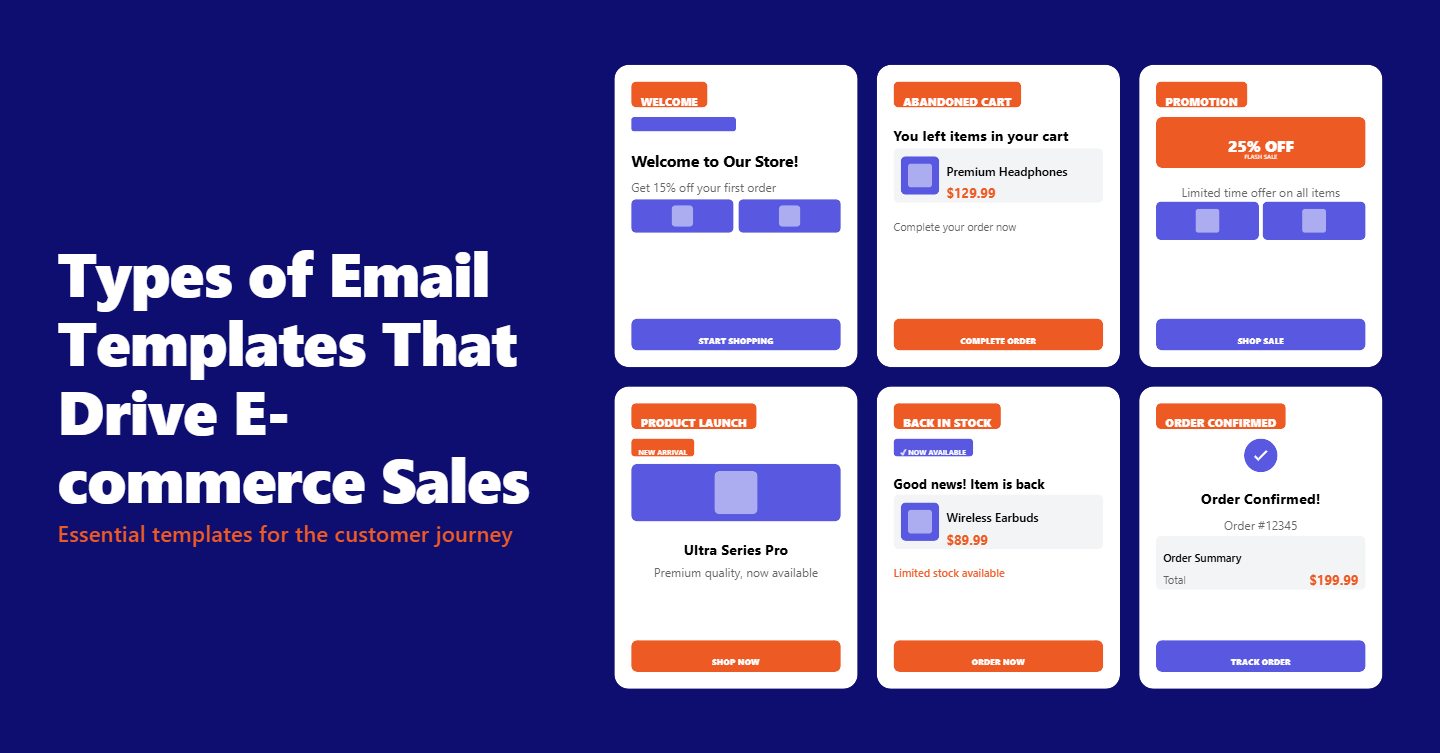
Several core types of email marketing templates consistently drive results for online stores.
Each serves a specific moment in the customer journey and benefits from a distinct structure and CTA.
Welcome and Onboarding Templates
Welcome emails set the tone and expectation. Use a clear hero, one main CTA, and a short value proposition.
Add social proof or rewards enrollment and a note about what subscribers will receive next.
A second or third onboarding touch can introduce categories, fit guides, or FAQs.
Promotional and Sale Templates
Promotions win when urgency and clarity lead.
Use a bold hero, concise offer copy, and a CTA above the fold. Follow with a product grid and a small text footer for terms.
The simplest structure usually converts best for limited-time offers.
Newsletter Templates
Types of newsletter templates span editorial features, product spotlights, and community updates.
For ecommerce, a single-column layout with a hero story followed by two to three content modules keeps engagement high without overwhelming the reader.
Aim for skimmable sections with a clear visual hierarchy.
Cart and Browse Abandonment Templates
Abandonment emails are reliable revenue drivers. Include the primary product image, price, and a prominent return-to-cart CTA.
Add secondary recommendations below the fold.
Keep copy short and empathetic, and consider a series with escalating persuasion.
Product Recommendation Templates
Recommendation templates shine with structured grids. Pull images, titles, prices, and URLs directly from your store feed.
Keep copy minimal and focus on category tags or personalized badges like “Because you viewed denim.”
Transactional Templates for Order and Shipping
Order confirmations, shipping notifications, and delivery updates are often the most opened emails you send.
Use clean, single-column layouts, large status headers, and quick links to track orders.
Add cross‑sell recommendations carefully without overshadowing functional details.
Post‑Purchase and Review Request Templates
Post‑purchase emails reinforce onboarding for new customers and invite engagement from repeat buyers.
A review request is high-converting when timed after delivery, with a clear image of the purchased item and a button to leave a rating.
If you use TargetBay Reviews, you can automate unlimited review requests, including photo and video reviews, for powerful social proof.
Win‑Back and Re‑Engagement Templates
Win‑back emails should feel personal and time-bound. Use a simple hero with a benefit-led headline, a small incentive, and a single CTA to reactivate.
Consider a preference update link for those who want to stay subscribed but change frequency.
Seasonal and Holiday Templates
Seasonal templates should blend brand identity with timely visuals.
Lean on thematic imagery in the hero, keep product grids tight, and use contrast-rich CTAs that pop in dark-mode inboxes.
Filtering a template library by season speeds selection.
Launch and Announcement Templates
For new collections or features, use a hero that tells a story and supporting modules that showcase use cases or design details.
Keep the primary CTA focused on the shop, with secondary links to lookbooks or landing pages.
Formats and Structure That Render and Convert
Understanding types of email formats helps you choose the right approach for each campaign.
HTML gives you design control and support for images, grids, and buttons.
Plain text mimics a personal email and can lift deliverability or engagement for re‑engagement messages.
Hybrid formats combine minimal HTML with text‑first styling to balance aesthetics and inbox placement.
The right choice depends on your goal and audience behavior.
For structure, single-column layouts are easiest to scan on mobile and reduce rendering issues.
Multi‑column grids can work for dense product recommendations or gift guides, but ensure they stack cleanly at smaller widths.
A classic hero plus grid pattern remains the ecommerce standard because it delivers a fast path to the CTA and highlights a few top products without clutter.
Accessibility and dark mode matter. Use clear alt text, sufficient color contrast, and larger tap targets for buttons.
Avoid images of text for essential content.
Test logos and CTAs in dark mode to prevent accidental invisibility.
Don’t overlook the brand sign-off. Types of email signatures range from simple typed names to logo-plus-social blocks.
Keep it compact, aligned to your brand voice, and consistent across templates to build recognition without adding noise.
How to Choose the Right Template Fast
Speed comes from a focused workflow. Start by clarifying the purpose of your message and the funnel stage it serves.
Is the goal acquisition, activation, conversion, or retention?
Match the template type to that objective to avoid over‑designing a layout that fights your message.
Next, filter by type, season, and industry to narrow options quickly.
In TargetBay Email & SMS, you can browse the 300+ library, search by keyword, or use filters to jump to the most relevant designs.
Hover to preview on desktop and mobile, then choose the template to open the editor.
Align the chosen template’s typography, colors, and spacing with your brand guidelines, and confirm it supports the level of dynamic content you need, such as product feeds or merge fields.
Finally, consider your audience’s reading context. If a large segment engages on mobile, select mobile‑first templates using single-column sections, large CTAs, and tight spacing.
If the campaign is high urgency, favor a direct hero and minimal copy over intricate editorial modules.
Customize Efficiently with Drag‑and‑Drop
Customization should never feel like rebuilding. In TargetBay Email & SMS, every template opens in a drag‑and‑drop editor with content elements like headings, text, images, video, menus, social icons, buttons, dividers, columns, and custom HTML.
You can adjust body-wide settings for text color, background color, content width, alignment, font family, preheader text, and link styles to keep branding and readability consistent.
Speed up ecommerce merchandising with prebuilt blocks for headers, carts, and recommended products.
The Product widget is your conversion catalyst. Drop it where you want products to appear, connect your store, and the feed automatically pulls product title, image, price, and URL.
Search by product title, SKU, or ID to curate the set for each campaign. This design pattern scales your sends without manual uploads.
Round out your visuals with stock imagery from the integrated image library when you need lifestyle context.
Maintain consistent button styles and ensure the primary CTA appears near the top.
Add a concise preheader that complements the subject line, and keep your signature or brand footer uniform across templates.
Personalization magnifies impact. Use merge tags for names, loyalty tiers, and last purchase categories.
If you run a rewards program with TargetBay Rewards, reference points, balances, or VIP tiers in your template to drive repeat purchases without heavy discounting.
QA and Workflow That Prevent Oops Moments
A reliable QA workflow saves revenue and reputation. Always preview on both desktop and mobile to check stacking, spacing, and contrast.
Use the built‑in preview to spot dark mode issues and image crops before you send. Then dispatch test emails to your inbox and a colleague’s to see how real clients render.
Remember that some merge tags won’t populate in tests; verify those fields with sample data or a staging list.
Version your templates as you iterate so you can revert quickly. In TargetBay Email & SMS, you can rename, save, duplicate, and manage your templates from the My Templates tab.
Download HTML when needed for development review or compliance checks. When everything looks right, links tracked, alt text written, product feed verified, launch as a campaign directly from the editor.
A tight checklist pays off. Confirm subject and preheader alignment, primary CTA placement, link tracking, personalization tokens, unsubscribe visibility, and deliverability‑friendly text-to-image ratio.
Salesforce-Specific: Understanding the Types of Email Templates
If your stack includes Salesforce, it helps to know the types of email templates available and when to use each.
In Salesforce Classic, you have four options: Text, HTML with Letterhead, Custom (without Letterhead), and Visualforce.
Text is simple and reliable, but limited in design. HTML with Letterhead provides consistent branding frameworks.
Custom HTML gives you full layout control without the letterhead wrapper.
Visualforce enables highly customized, data-driven templates and complex logic, often used for advanced transactional or system emails.
In Salesforce Lightning, the model shifts toward Enhanced or Lightning Email Templates.
These use component‑based design, folders for organization, and rich merge fields that pull in related objects.
For many teams, Lightning Email Templates are easier to maintain and more consistent with modern content operations.
If you’re asking how many types of email templates in Salesforce matter for ecommerce today, think of it as Classic’s four plus Lightning’s flexible, componentized approach.
Choose Text for hyper‑personal, plain‑language re‑engagement, HTML or Custom for promotional layouts, and Lightning Templates for scalable, data‑rich messages in a modern UI.
More Email Template Resources for You
Optimization Tips That Compound Results
Optimization starts at the subject line and preheader. Test curiosity versus clarity, promotional framing versus value-first messaging, and the impact of personalization.
Keep your hero copy brief and action-led, and test CTA language that focuses on benefits instead of generic “Shop Now” phrasing.
Personalize beyond a first name. Use merge tags to reflect category affinity, last viewed items, or loyalty status, and populate the Product widget with tailored recommendations.
Time and frequency matter too. Abandonment series should trigger within hours, while review requests should arrive after delivery with a gentle follow-up.
For cadence, track opt-outs and clicks to find your saturation point.
Judge performance by the metrics that map to revenue. CTR shows interest in your offer, CVR reveals intent, and revenue per email aligns design decisions with bottom‑line outcomes.
Layer in cohort analysis to learn which template types and formats resonate with new versus repeat buyers.
If you collect reviews through TargetBay Reviews, close the loop by showcasing recent ratings in your templates.
Social proof inside emails increases click confidence and reduces friction to purchase without heavy discounts.
Conclusion
The fastest route from send to sale is matching your message with the right template, structure, and workflow.
When you start from proven types of email templates, choose formats that render cleanly, and plug in dynamic product blocks, you remove the friction that kills conversion.
TargetBay Email & SMS gives ecommerce teams a practical edge with a library of 300+ templates, drag‑and‑drop editing, product feed widgets, and reliable preview and testing, so you can ship campaigns faster and with more confidence.