



TL;DR
🤖 AI decides visibility: Gmail now uses Gemini AI to summarize and prioritize emails, so visibility depends on how clearly your email is understood, not just whether it lands in the inbox.
🖼️ Clarity beats cleverness: Emails that rely on images, clever copy, or vague CTAs risk losing their offers and urgency when AI generates summaries.
🧩 Structure for AI reading: Use clear subject lines, text-first layouts, semantic HTML, and explicit CTAs to help Gemini surface your message correctly.
🔁 Fix in layers, not all at once: You don’t need to fix everything at once. Start with alignment (subject → preview → opening) and improve structure gradually.
⚙️ Let AI handle the heavy lifting: Tools like TargetBay’s AI Email Agent can handle layout, structure, and AI-readability so you can focus on strategy and revenue.
Google has begun integrating Gemini AI directly into Gmail. This is not a cosmetic update. It changes how emails are read, summarized, and prioritized inside the inbox.
For e-commerce brands that rely on email for revenue, this matters because email visibility is no longer determined by deliverability alone. Your email can land in the inbox and still be ignored, misunderstood, or reduced to a one-line AI summary that removes urgency, offers, or context.
This guide explains what changed, why it matters, and what ecommerce brands should do now to stay visible and keep email-driven revenue stable.
Gmail Has Changed Forever. And Email Visibility Is No Longer Just Deliverability
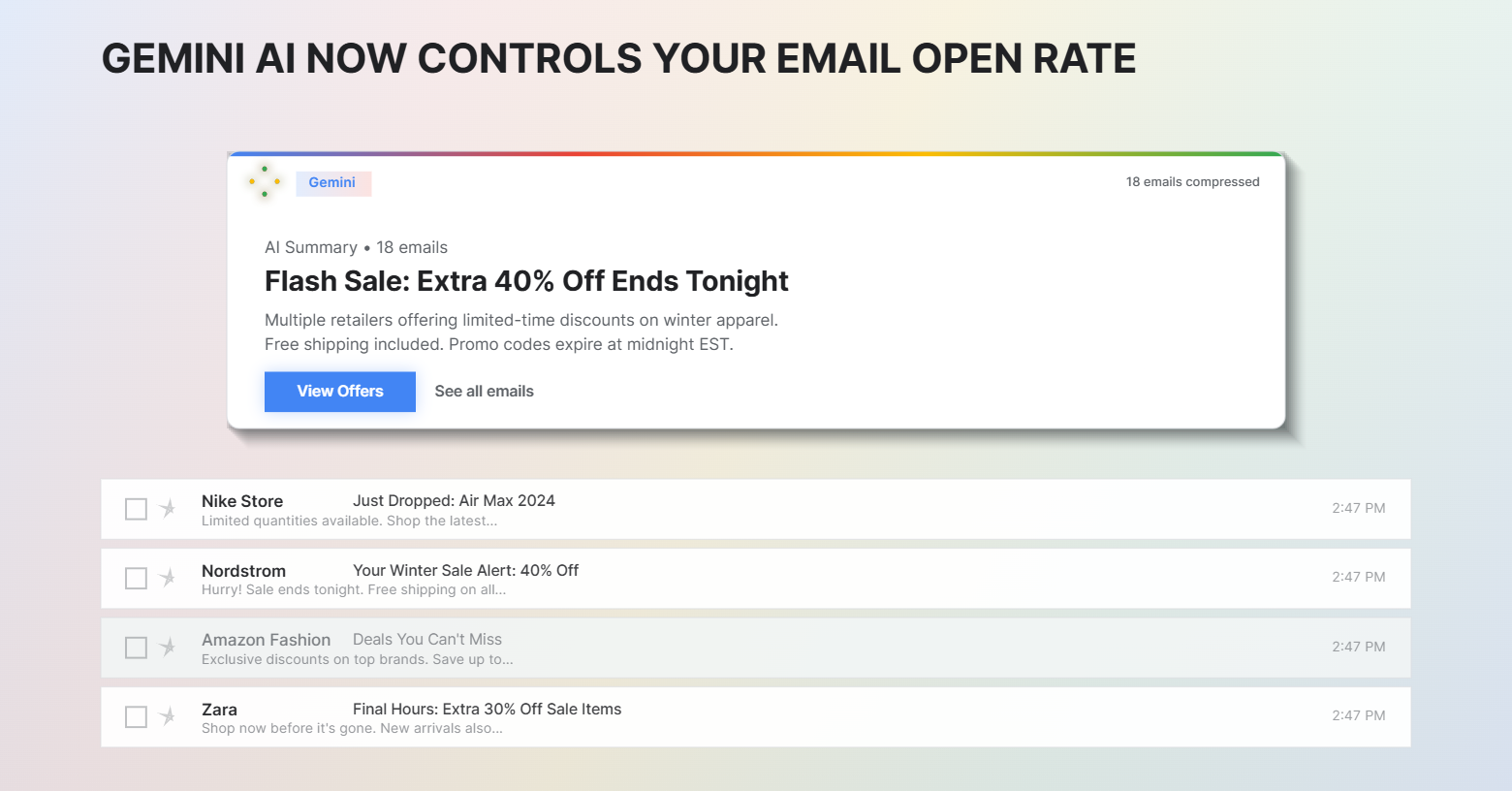
With Gemini, Gmail now reads emails on behalf of users. It summarizes long messages, surfaces key information, and decides what matters most before a human even opens the email.
This means your email is no longer judged only by spam filters or inbox placement. It is judged by how clearly an AI model can understand your message.
Why “good deliverability” is no longer enough
Deliverability answers where your email lands. Gemini influences what the user sees.
If your email is unclear, image-heavy, or structurally confusing, the AI summary may remove your offer, skip urgency, or misrepresent intent. That is a visibility loss that traditional metrics will not show.
What This Means for E-commerce Store Owners Who Rely on Email Revenue
AI decides what the customer sees first
In many inboxes, the first thing users will see is not your subject line or your hero image. It is Gemini’s summary.
If your value is buried, your discount is in an image, or your CTA is vague, the summary will not carry it forward.
Ambiguous emails lose to clearer ones (even if yours look better)
Creative subject lines, clever copy, and image-only layouts are used to win attention. In an AI inbox, they lose clarity.
Gemini rewards emails that explain themselves quickly, directly, and consistently. Clarity now outperforms creativity in terms of visibility.
This change hits small and mid-sized brands hardest
Large brands benefit from recognition. Smaller brands depend on the message itself to earn attention.
When AI summarizes emails, brand recall matters less than structure and clarity. This makes preparation essential for small and mid-sized e-commerce stores.
What You Should Do Now to Prepare (Without Rebuilding Everything)
You do not need to redesign every template today. You need to make your emails easier to understand for both humans and AI. Start with structure, not polish.
1. Fix the First Thing AI Reads: Subject Line, Preview, Opening Line
Your subject line, preview text, and first sentence must communicate the same idea. This alignment helps Gemini generate accurate summaries and avoids dropped context.
Prioritize clarity over cleverness
Avoid vague hooks, jokes, or wordplay that delay meaning. Gemini struggles with interpretation and rewards direct language.
2. Structure the Email Body So AI Can Understand It Instantly
Replace image-only designs with text-first layouts.
AI models understand text faster and more accurately than images. If your email is one large image, Gemini has nothing to summarize.
Use hybrid layouts: text for meaning, images for support.
Every Email Must Answer Three Questions
1. What is this email about?
2. Why does it matter to the reader?
3. What should they do next?
If any of these are missing, AI summaries become incomplete.
Keep terminology consistent throughout the email
Do not change names mid-email. If it is a “reward,” keep it a reward. If it is a “sale,” do not later call it a “deal.” Consistency improves AI understanding.
3. Be Direct With Actions: AI Can’t Infer Intent
Choose one primary action per email. When you imply multiple actions, AI cannot determine what matters. Pick one action and reinforce it clearly.
Write CTAs that explain the action. Avoid generic CTAs like “Learn more” or “Click here.” Use language that states the outcome: “Shop the Valentine’s Collection” or “Activate Free Shipping.”
4. Make Your Email Layout Machine-Readable (Without Killing Design)
Use live text headers and navigation. Navigation menus built as images are invisible to AI. Use live text for headers and links so meaning remains intact in summaries.
Use semantic HTML intentionally
H1 should explain what the email is.
H2 should highlight offers or benefits.
H3 should support with details.
Gemini gives more weight to headings and the text that follows them.
5. Optimize Images So They Support the Summary, Not Replace It
Add descriptive alt text to meaningful images
Alt text is no longer optional. It is a primary source of context for AI when images contain important information.
Add short benefit captions below product images
Explain why the product matters and why it is relevant now. Captions help summaries retain intent.
6. Use Text-Based Banners for Offers That Must Be Seen
Move key offers out of images
Free shipping, loyalty perks, and VIP offers should be written as live text banners. If the offer matters, it must be readable without images.
7. Turn Your Footer Into a Trust Signal for AI and Users
Make the email footer a help section
Include live-text links for support, preferences, account access, loyalty, and store locator.
AI uses footers to assess legitimacy. Plain text links improve trust and credibility.
8. Test Lightweight Emails Before Gemini Rolls Out Globally
Which emails to test first
Founder notes, announcements, and product launches work best for testing because they rely on text, not design.
What to observe inside Gmail
Look at the AI summary. Check what is included and what is missing. Adjust the structure based on what Gemini surfaces.
9. Use Gemini as Your Final QA Step
Summarize your email with Gemini before sending. If Gemini misses your offer or urgency, the email is not ready. Fix it before it reaches customers.
Why will this become a new best practice
AI-readability will become as important as mobile responsiveness. Build it into your workflow now.
The Reality: Doing All of This Perfectly Takes Time (And That’s Fine)
Most teams can’t rebuild templates overnight. Legacy templates, limited resources, and campaign pressure make perfect implementation unrealistic. That is normal.
The risk of partial fixes. Random improvements without structural consistency could confuse AI. Hence, you need systems, not one-off optimizations.
Optimizing Email Templates for Gemini AI in Gmail
Before Optimization
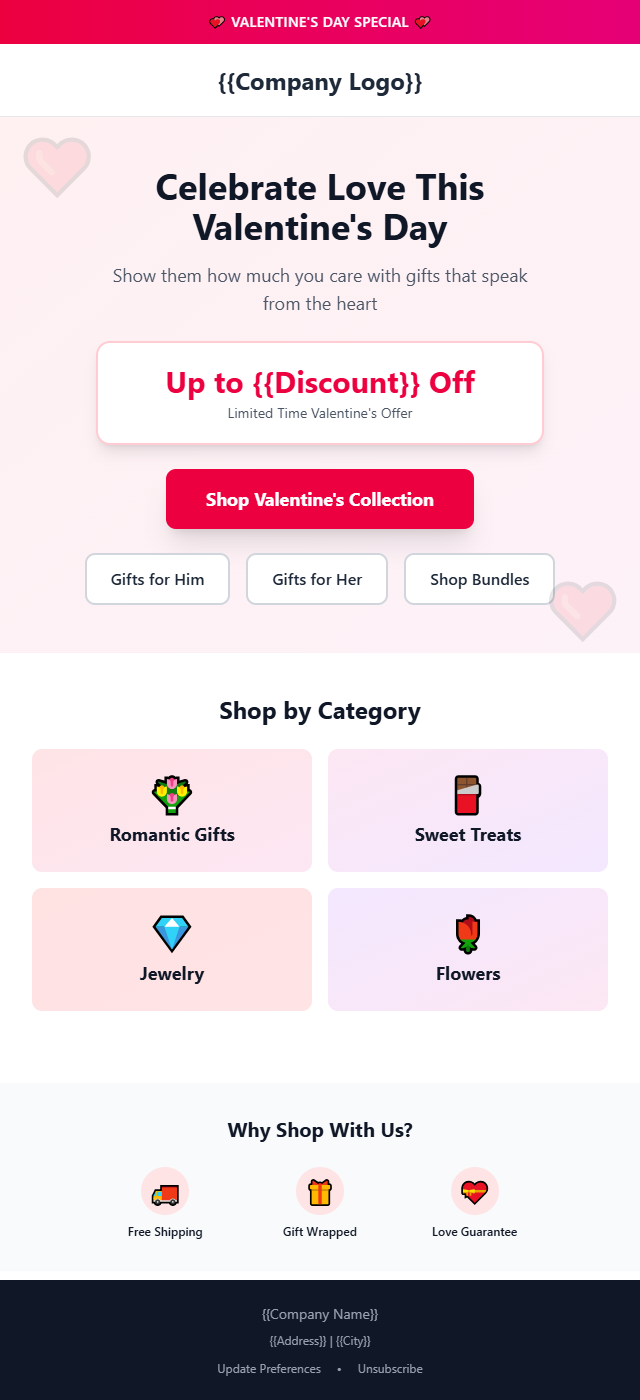
After Optimization

How TargetBay’s AI Email Agent Handles the Heavy Lifting
Meet the AI Agent That Speaks Gemini
TargetBay’s AI Email Agent is built for how Gmail now interprets emails. It does more than write copy. It engineers structure, clarity, and visibility for AI inboxes.
The Old Way vs The TargetBay AI Way
Image-heavy blasts → Hybrid text layouts
Your emails remain visual, but AI-readable. Offers and urgency appear in the text layer every time.
Static templates → Adaptive, lightweight HTML
The AI generates clean, fast-loading code that parses easily for LLMs and works across devices.
Guesswork timing → Predictive intelligence
The agent learns from engagement patterns and LLM behavior to send when users are most likely to act.
4 Practical Ways TargetBay Helps You Win the Gemini Inbox
Front-loads value for AI summaries
Discounts, deadlines, and urgency appear in the first 100 words so summaries capture what matters.
Automatically builds hybrid layouts
You get branding and readability without manual design trade-offs.
Injects schema for priority badging
Transactional emails receive proper schema so Gmail flags them as important.
Generates conversational copy that invites replies
Gemini suggests replies based on tone. Conversational emails get “Reply,” not “Unsubscribe.”
What to Do Next (Without Overhauling Everything)
Start with one or two changes, not all of them
Fix the subject line, preview, and opening alignment first. Then move to layout and CTAs.
Update templates once, not every campaign
Treat this as infrastructure. A good structure compounds over time.
Use AI where consistency matters most
Let systems handle structure and compliance. Let humans focus on strategy and offers.
Build Emails Gemini Actually Understands
Stop guessing. Let TargetBay’s AI Email Agent structure, time, and optimize emails for Gmail’s AI inbox.
See It in Action