



⭐ Key Takeaways
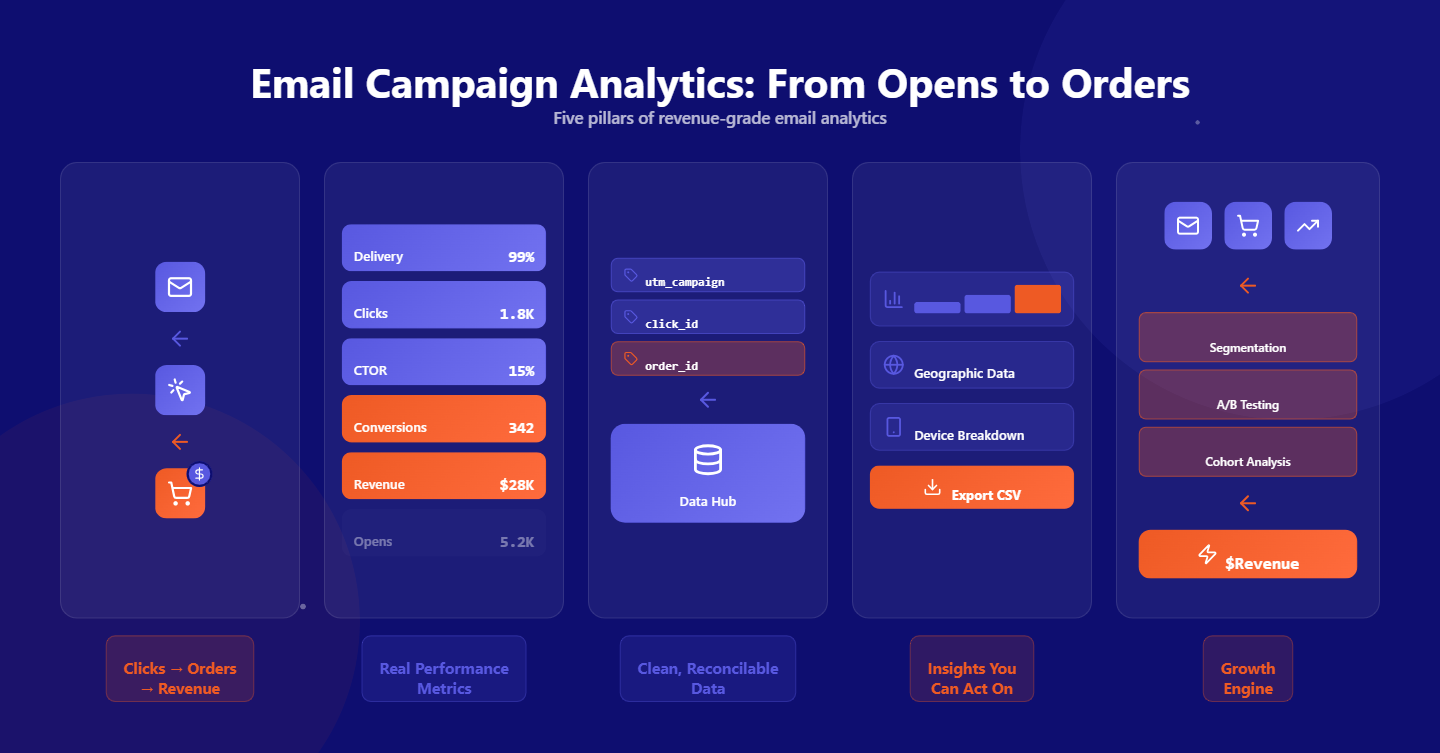
🔗 Revenue-grade attribution: Email campaign analytics must connect clicks to orders, with reliable attribution, to turn engagement signals into revenue insights you can act on and defend with your finance team.
📊 Metrics that actually matter: Prioritize delivery health, clicks, CTOR, conversions, and revenue per recipient, while treating opens as directional signals influenced by Apple Mail Privacy Protection and bot activity across clients.
🧩 Clean data foundations: Use link wrapping, UTM tags, and click IDs to reconcile orders, and standardize attribution windows and definitions in an email marketing analytics template for consistent, comparable reporting.
📈 Actionable dashboards: Build dashboards that surface link-level winners, device and client breakdowns, geo trends, and near real-time updates, while enabling CSV exports for deeper analysis and stakeholder-ready readouts.
⚙️ Tools that compound growth: Choose email marketing analytics tools like TargetBay Email & SMS that integrate with your store, attribute revenue accurately, and support testing, segmentation, and cohort analysis to compound e-commerce growth.
For e-commerce marketers, the fastest way to accelerate revenue is to turn email campaign analytics into a repeatable decision engine.
When you can trust the data, see which links actually convert, and stitch clicks to orders, you stop guessing and start compounding wins.
This playbook shows you how to build a reliable analytics foundation, move past vanity metrics, and report performance in ways that drive real ROI.
The focus is practical and revenue-first, tailored for e-commerce brands running email at scale.
What Is Email Campaign Analytics (and Why It Matters for E-commerce Revenue)
Email campaign analytics is the measurement and analysis of how your email sends translate into engagement, conversions, and revenue.
It goes beyond opens and clicks to answer the only question that matters: which campaigns, audiences, and content reliably produce orders and customer value.
For e-commerce, the stakes are higher. Your emails push traffic to product pages, and your store records orders, AOV, and LTV.
Without clear attribution between these systems, you cannot defend spend, optimize offers, or scale confidently.
With strong email data analytics, every campaign becomes a testable hypothesis, every test creates a learning loop, and every loop compounds revenue.
The Core Metrics That Matter for E-commerce
Delivery Health: Sends, Delivered, Bounces
Start with a clean baseline. Track total sends and successful deliveries to understand reach.
Watch bounce rate closely; hard bounces indicate list hygiene issues, and soft bounces can flag temporary delivery problems.
Stable deliverability keeps engagement metrics honest and protects your sender reputation.
Engagement: Opens, Clicks, and CTOR
Separate unique from total. Unique opens and unique clicks count each recipient once.
Total opens and clicks include multiple interactions from the same person. Click-to-open rate (CTOR) shows how persuasive your content is for those who actually saw the email.
With Apple Mail Privacy Protection inflating opens, treat open rate as a directional metric and give more weight to click rate and CTOR.
Conversion and Revenue: The Business End
Tie clicks to on-site conversions. Track orders, revenue, conversion rate, and revenue per recipient to understand sales efficiency.
Add revenue per click, average order value, and revenue per campaign to compare creative and audience performance.
If you can, include early LTV for cohorts driven by email to value campaigns beyond single orders.
Data You Can Trust: Methods and Hygiene
Tracking Pixels and Unique vs. Total Logic
Opens are recorded via a small tracking pixel. That pixel helps you measure engagement but is prone to inflation from privacy features.
Use unique vs. total logic consistently across opens and clicks to compare campaigns apples to apples.
Unique metrics are best for reach and engagement; totals are helpful when measuring repeat interest or micro-interactions in long sequences.
Link Wrapping, Redirects, and UTM Tags
Clicks are the backbone of reliable email tracking analytics. Wrap every link with a redirect that assigns a unique click ID.
Append UTM parameters to attribute traffic in your analytics platform. When orders happen, reconcile click IDs and UTM tags back to campaign IDs so you can allocate revenue correctly across campaigns and audiences.
Bot Filtering and Handling Apple MPP
Adopt a layered approach to bot filtering. Suppress activity from known bot user agents, filter rapid-fire opens and clicks that occur within impossible time windows, and de-duplicate suspicious events.
For Apple MPP, segment openers by client and device, and lean into clicks, conversions, and revenue as your source of truth.
Use engaged segments built on clicks and purchases for critical optimization decisions.
Near Real-Time Updates and Accuracy
Your decisions are only as fast as your data. Analytics that update within minutes help you salvage underperforming sends, switch out links, and extend winning promotions while they’re hot.
Accuracy needs to be tight enough to trust deltas, small day-over-day improvements add up when your measurement is consistent.
Link-Level Insights That Move the Needle
Identify Top-Performing Links and CTAs
Campaign averages hide winners. Break performance down to the link level to see which CTAs, products, and placements drive the most clicks and revenue.
Compare in-body text links versus buttons, primary versus secondary CTAs, and above-the-fold versus below-the-fold modules.
This clarity guides both content strategy and merchandising decisions.
Content Heatmaps and Click Distribution
A click heatmap, aggregating where recipients interact within your email, exposes how people scan your layout.
If the hero section gets attention but the top-selling product card converts better, elevate it. When clicks cluster on non-essential links, simplify your layout and reduce exits that dilute intent.
Use these patterns to refine modular templates and standardize winning placements.
Copy and Design Tests You Can Trust
Test one variable at a time and measure at the link level.
Subject line tests affect opens; CTA copy and placement affect CTOR; product mix and offer clarity affect conversion rate and revenue per recipient.
Establish minimum sample sizes, define success thresholds, and log results in a shared email marketing analytics report so wins are portable across the team.
Revenue and ROI Attribution That Actually Adds Up
E-commerce Integrations and Order Stitching
Integrations between your email platform and store are non-negotiable. Pass campaign IDs, message IDs, and click IDs through to checkout. On conversion, stitch orders back to the originating campaign. This step turns email campaign analysis from a guessing game into a ledger you can defend with finance.
Attribution Windows and Models
Define an attribution window that reflects your buying cycle. For most e-commerce emails, 3–7 days works for campaigns and 24 hours for flash sales, but your data should inform the choice. Decide on last click, first click, or weighted attribution and stick to it for comparability. Document the rules in your email marketing analytics template so new campaigns inherit the standard.
Cohort Analysis, AOV, and LTV
Beyond campaign revenue, watch what kinds of customers your emails create. Analyze cohorts by opt-in source, first purchase category, discount depth, and device. If a campaign with lower immediate revenue generates higher AOV or better 90-day LTV, it may deserve more budget. Cohorts help you optimize acquisition quality rather than just volume.
Segmentation and Trends to Scale Wins
Date-Range Filters and Campaign Comparisons
Trend spotting requires flexible slicing. Filter by week, month, promotion period, and seasonal windows to see how performance shifts. Compare campaigns by type, product launch, sale, content newsletter, and by audience, loyalty members, first-time buyers, inactive subscribers. Consistent comparisons make your learning loops faster and cleaner.
Device, Email Client, and Geo Breakdowns
Design decisions live and die by device and client data. If 70 percent of revenue comes from mobile Gmail, prioritize thumb-friendly layouts, tighter copy, and shorter landing experiences. Geographic insights refine send times, shipping messaging, localized offers, and inventory allocation. When your email marketing analytics dashboard surfaces this context, optimization becomes systematic.
Benchmarks for E-commerce
Keep internal and external benchmarks. Internally, compare to your trailing 90-day median to control for seasonality. Externally, track category-level baselines for open rate ranges, click rates, CTOR, conversion rates, and revenue per recipient. Use benchmarks as guardrails, not excuses, your best benchmark is last month’s own performance.
Build Your Email Marketing Analytics Dashboard and Report
Must-Have Charts and Metrics
Build a dashboard that loads fast, tells a story, and answers “so what” at a glance. Start with a campaign overview showing sends, delivered, open rate, click rate, CTOR, conversion rate, and revenue per recipient. Add trend lines for opens, clicks, and revenue over time; a top-links chart with click and revenue contribution; and breakdowns by device, email client, and geography. Include a conversions panel with AOV, revenue per campaign, and orders attributed to email.
Templates, Cadence, CSV Exports, and Stakeholder Readouts
Create an email marketing analytics template for weekly and monthly reporting. Standardize definitions, attribution windows, and thresholds for “green” or “red” performance. Adopt a weekly cadence for campaign-level metrics and a monthly readout for cohort and LTV trends. Ensure analysts can export raw data to CSV for deep dives while executives get a clean summary with the key moves to make next.
Turning Insights into Action with TargetBay Email & SMS
The right email marketing analytics software should make everything above effortless. With TargetBay Email & SMS, you can track unique and total opens and clicks, apply bot filtering, record link-level performance, and attribute revenue through direct e-commerce integrations. Dashboards update in near real time, include device, client, and geo breakdowns, and support comparisons and CSV exports. If you also use TargetBay Reviews or TargetBay Rewards, fold social proof and loyalty segments into your campaigns and measure the lift in conversion and repeat purchase rate, all in one ecosystem.
Conclusion
When your email tracking analytics and e-commerce data work as one, you learn faster, optimize smarter, and confidently scale what sells.
TargetBay Email & SMS gives e-commerce brands the analytics foundation to move from opens to orders, turning every send into a predictable revenue driver.