



⭐ Quick Summary
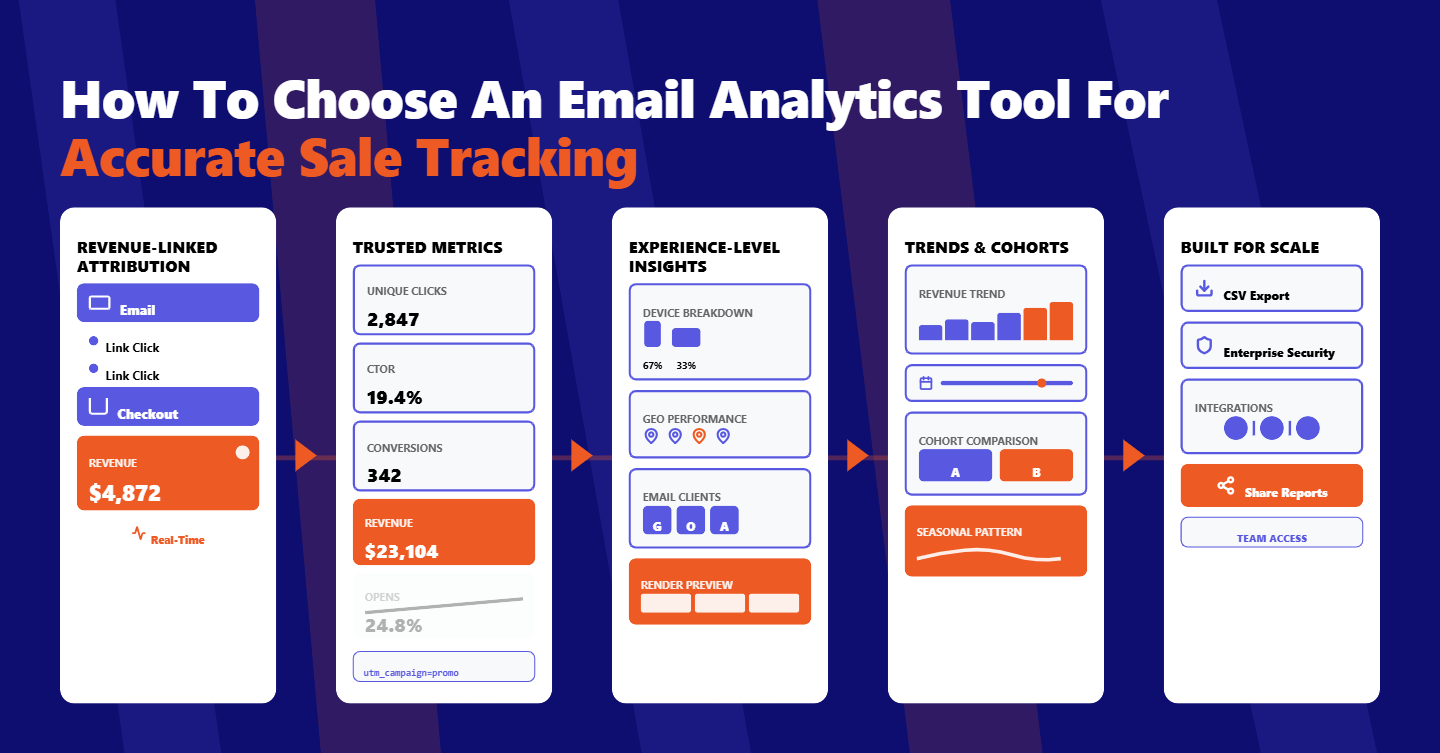
💰 Revenue-linked attribution: A modern email analytics tool should attribute revenue from click to checkout, provide link-level insights, and update near real-time so e-commerce teams shift from guesswork to measurable, repeatable growth with confidence.
📊 Metrics you can trust: Trust unique clicks, click-to-open rate, conversions, and revenue over opens, especially after privacy changes, and enforce a consistent UTM strategy to preserve attribution integrity across campaigns, segments, and channels.
📱 Experience-aware insights: Geography, device, and email client breakdowns inform send times, design choices, and rendering fixes, ensuring your highest-value subscribers experience fast, readable messages that convert on their preferred screens.
📈 Trend and cohort analysis: Trend analysis with flexible date range filters and cohort comparisons reveals seasonality, validates creative changes, and uncovers offer patterns, enabling faster iteration and smarter budgeting across the email program.
🛠️ Built for scale and sharing: Demand scalability, security, CSV exports, Outlook and Gmail compatibility, and native e-commerce integrations; these must-have features ensure your analytics are reliable, shareable, and built to support aggressive growth.
An email that can’t prove revenue is just an expense.
E-commerce marketers need an email analytics tool built to answer one question with clarity: which campaigns and links generate revenue.
Most teams still wrestle with blind spots. Open rates inflated by privacy features, delayed or incomplete click data, no link-level insights, and no way to compare performance by segment or across time.
When your analytics can’t scale to big lists, or you can’t export a clean CSV, you end up flying by instinct instead of evidence.
That’s where purpose-built email analytics software changes the game.
What Is an Email Analytics Tool? The Metrics That Actually Matter
An email analytics tool measures performance beyond send and deliver events.
It captures the engagement signals you care about and maps them to conversions and revenue so you can optimize with confidence.
For e‑commerce, the core metrics are straightforward. You need sends, deliveries, opens, unique opens, clicks, unique clicks, unsubscribes, and bounces.
You also need derived rates like open rate, click rate, click‑to‑open rate, bounce rate, and unsubscribe rate to normalize comparisons.
Revenue and conversions should sit alongside engagement by default.
If an email analysis tool can’t tie orders back to campaigns and links, it won’t help you justify budget or prove ROI to your leadership.
Real value comes from timeliness and trust.
Look for near real‑time updates within minutes, historical retention that doesn’t expire, and accuracy you can rely on when you report to finance or your CEO.
How Revenue Attribution Really Works
Modern tools use two pillars for attribution. Opens use a lightweight tracking pixel, and clicks use link wrapping that redirects through a tracking domain before landing on your store.
Click-based attribution should be your north star.
When a recipient clicks a tracked link, the email analytics software sets identifiers and UTMs that your store recognizes at checkout, tying orders back to the email and the specific link.
Your UTM strategy matters more than most teams realize.
Keep a consistent taxonomy for source, medium, campaign, content, and term, and ensure your email tracking tool automatically appends UTMs to every link variation, including dynamic product blocks.
E‑commerce integrations close the loop.
Whether your store runs on Shopify or WooCommerce, the analytics should sync orders and revenue to campaigns with minimal setup, using client‑side events and server‑side webhooks to harden data accuracy.
Privacy changes make precision even more important.
With Apple’s Mail Privacy Protection inflating opens, lean on clicks, conversions, and revenue. A modern email analytics tool will emphasize click‑based attribution and adjust reporting to avoid misleading open spikes.
Engagement Quality: Signals You Can Trust
Unique and total counts tell different stories. Unique opens and clicks show how many people engaged. Totals show intensity by counting repeat interactions from the same person.
Click‑to‑open rate is a powerful quality metric. It evaluates how effectively your content converts curiosity into action, rather than rewarding subject lines alone.
If the CTO rises, your creatives and offers are working harder.
Keep an eye on list health. Unsubscribes and bounces surface deliverability risks and audience fatigue. If unsubscribes climb, your cadence or segmentation may be off. If bounces spike, you need better acquisition and verification hygiene.
Post‑privacy, treat opens as directional. Protect your decision-making by benchmarking with unique clicks, CTO, conversions, and revenue.
If you see sudden open inflation without corresponding clicks, you likely have privacy features at play.
Link‑Level Click Analytics That Drive Better Content
Knowing which links earn clicks is the fastest way to optimize your next send.
Link‑level click analytics show which product tiles, hero buttons, text links, and navigation elements actually move shoppers forward.
This is where copy and creative debates end.
If a secondary CTA is consistently beating your hero button, you have immediate evidence to elevate that message or reposition it in the layout.
Product‑level insights unlock merchandising wins. When a specific SKU link outperforms, pair it with a time‑bound offer next send or feature it in your automated flows. Tie link clicks to revenue, not just traffic, to prioritize content that sells.
Small tweaks compound. Swap vague CTAs for specific actions, tighten pre-header copy to align with the top‑performing section, and reduce competing links when your analytics show scattered engagement. Better clicks stack up to better cash flow.
Audience Context Breakdown: Geography, Device, and Email Client
Context turns raw numbers into smarter decisions. Geographic data helps you tune send times by time zone, tailor currency and shipping messages, and localize seasonal promotions for regions driving the most revenue.
Device breakdowns shape your design rules. If most revenue comes from mobile, your above‑the‑fold content should be thumb‑friendly, with large tap targets and compressed images. If desktop skews higher in certain segments, consider longer editorial formats.
Email client insights sharpen rendering choices. Outlook quirks and Gmail clipping can quietly suppress clicks.
An email inbox analytics view showing client distribution helps you make design and code decisions that reduce friction where it matters most.
Compatibility matters at the tracking layer too. Ensure your platform functions as an email tracking tool for Gmail and an email tracking tool for Outlook, so your data stays reliable regardless of where subscribers read your message.
Trend Analysis: Compare Campaigns and Cohorts
Is last week’s win repeatable or a blip?
Robust trend analysis lets you compare campaigns and cohorts over custom date ranges, so you can separate seasonality from genuine strategy shifts.
Start with apples‑to‑apples comparisons, evaluate similar promotional themes month over month, then layer in segmentation by customer lifecycle stage, average order value, or product category.
If a cohort deviates, investigate the content and offer differences.
Visual timelines reveal turning points, maybe a new CTA framework lifted CTO steadily across four sends.
Maybe a creative refresh boosted mobile conversions. A clean, responsive dashboard with fast-loading charts helps teams debate less and act more.
When you can filter by date range and segment in seconds, testing accelerates.
You’ll stop waiting for quarterly recaps and start shipping incremental improvements driven by patterns you can defend.
Reporting Workflow: Real‑Time Dashboards, Accuracy, and Exports
Expect analytics to refresh in near real‑time, ideally within about five minutes of activity, so you can evaluate performance while campaigns are still live.
Performance standards count. Dashboards should load quickly, even with large datasets, so your team doesn’t stall during reviews. Accuracy should be tight enough to satisfy finance when you reconcile revenue, with a defined error margin.
Exports are non‑negotiable. Clean CSV exports let you share results with stakeholders, archive snapshots, and blend email data into your BI stack. When manual reporting disappears, marketers get hours back for testing and creative work.
Security and governance are table stakes. Role‑based permissions and tenant‑level data isolation ensure only authorized users see sensitive revenue data. When compliance and privacy boxes are ticked, you can scale measurement without risk.
Buying Checklist: What To Demand Before You Commit
Scalability protects your future growth. Your email analytics tool should handle campaigns with millions of recipients, maintain historical data indefinitely, and keep performance snappy as your list expands and your frequency increases.
Prioritize full‑funnel attribution. Confirm link wrapping, consistent UTM handling, and native e‑commerce integrations that attribute orders and revenue back to campaigns, segments, and even individual links.
Look for comprehensive context. You want device and email client breakdowns, geographic distribution, and event streams that distinguish unique versus total interactions. These views transform vague trends into actionable decisions.
Insist on real‑world workflow features. Near real‑time updates, precise accuracy, date range filters, visual charts, and one‑click CSV exports should be standard. If you rely on an email marketing tool list to evaluate vendors, ensure these capabilities top your criteria.
Don’t overlook compatibility. Make sure tracking works reliably across modern clients as well as legacy reads, including strong support for email analytics tools for Outlook and Gmail, so engagement isn’t misreported by client quirks.
Evaluate free versus paid honestly. Email analytics tools free tiers can help you start, but e‑commerce requires revenue attribution, deep link analytics, and scale‑grade reliability that typically live in paid plans. Choose value over vanity features.
Consider your stack holistically. If your sending platform already excels at deployment, a complementary email analysis tool may give you deeper insights. If you prefer an all‑in‑one approach, ensure analytics depth isn’t sacrificed for convenience.
Conclusion
Turning sends into sales demands analytics that think like a merchant. When your platform measures what matters, attributes revenue confidently, and scales without friction, you shift from guessing to compounding growth.
TargetBay Email & SMS brings these capabilities together for e‑commerce brands. You get link‑level click analytics, click‑based revenue attribution, near real‑time dashboards, and simple CSV exports, all designed to help you act faster and prove ROI.
Paired with TargetBay Reviews for social proof and TargetBay Rewards for loyalty lift, your lifecycle marketing becomes measurable end-to-end.