



⭐ Quick Summary
⚙️ Templates that scale quality: Automated email templates standardize design, copy, and personalization, saving hours weekly while boosting conversions, consistency, and deliverability for ecommerce brands that need scale without sacrificing quality, creativity, or customer experience.
🤖 AI-powered speed: TargetBay Email & SMS empowers fast production with AI heading, text, image, and CTA generators, letting marketers launch polished templates in minutes and measure results confidently across every lifecycle stage.
📤 Right tool for the job: Use Outlook for internal out-of-office replies, but keep customer-facing automations in your marketing platform to leverage segmentation, dynamic content, and revenue attribution without compromising inbox experience or brand control.
♿ Accessible by default: Build for accessibility and mobile-first consumption, with readable fonts, descriptive alt text, strong color contrast, and tap-friendly CTAs, ensuring every shopper can understand and act on your offers quickly.
📈 Continuous optimization: Optimize continuously by A/B testing subject lines and CTAs, monitoring opens, clicks, revenue per send, and complaints, while protecting deliverability with SPF, DKIM, DMARC, list hygiene, quiet hours, and smart frequency capping.
If you are still hand-crafting every campaign, you are leaving revenue on the table.
For ecommerce brands, the fastest path to consistent performance is a well-built automated email template that you can deploy in minutes, not hours.
The right framework standardizes design, keeps copy on-brand, and personalizes at scale, so every message looks sharp and converts, without the constant back-and-forth with design or copy.
The payoff is immediate. Marketers who systematize email creation move faster, test more, and generate more revenue per send.
With AI-assisted tools inside TargetBay Email & SMS, you can go from idea to send-ready templates in one sitting, while strengthening email deliverability and keeping your tone consistent across every campaign.
What Is an Automated Email Template and Why Does It Matter for Ecommerce
An automated email template is a reusable, pre-designed email layout wired with your brand styles, content blocks, and personalization tokens that automatically pull the right content for each recipient.
It triggers from events like a new signup, a cart abandonment, or a shipped order.
In ecommerce, this matters because time, consistency, and relevance drive revenue.
When the skeleton is solid, you only swap in context, and the system handles the rest.
Templates save hours by removing repetitive formatting and design.
They protect your conversion rate because subject lines, CTAs, and content blocks are already tested and optimized.
They enable personalization at scale, using dynamic content to tailor products, categories, and messages to each shopper.
And they reduce human error, which improves deliverability and brand trust.
More Email Template Resources for You
The Essential Parts of a High-Converting Template
Headings and Preheaders That Earn the Open
Your subject line and preheader copy decide whether the message gets seen.
Keep subject lines clear, benefit-led, and under 50 characters when possible.
Use preheaders to extend the promise, avoid repeating the subject, and preview the value.
Body Copy That Scans Fast
Use short paragraphs, strong first sentences, and obvious subheads.
Lead with value, follow with proof, then provide the action.
Keep a single primary goal per email to prevent competing clicks.
Images That Support, Not Distract
Feature one hero image and a supporting image if needed.
Compress files, add descriptive alt text, and maintain a consistent style.
Images should clarify the offer or show the product in context.
CTAs That Remove Friction
Your CTA should be specific, action-oriented, and consistent across the email.
“Shop the Bundle,” “Complete Your Order,” or “Track Your Package” beat vague “Learn More.”
Use one primary button color and keep it above the fold.
Personalization Tokens and Dynamic Content
Tokens such as first name, last product viewed, recommended categories, and loyalty balance give relevance a boost.
Dynamic blocks enable you to swap sections by segment, inventory, location, or behaviour, transforming a single automated email message template into hundreds of personalised variants.
Compliance and Privacy
Build templates that respect CAN-SPAM and GDPR by default.
Always include a physical mailing address, a visible unsubscribe link, and a clear reason for receiving the email.
Honor consent, document preferences, and suppress contacts who opt out.
Accessibility from the Ground Up
Use semantic headings, sufficient color contrast, HTML text over text-in-images, and descriptive alt text.
Keep font sizes readable and ensure the email works without images. Accessibility improves UX for everyone and reduces spam complaints.
Types of Templates and When to Use Each
Welcome Series
Trigger from an automated email form or signup at checkout. Introduce your brand, set expectations, and deliver a clear first purchase incentive.
Keep it friendly and focused on the next step.
Cart Abandonment
Send a helpful reminder with the saved items, social proof, and a friction-reducing CTA.
Time the first send within one to three hours, with a follow-up the next day if needed.
Order Confirmation and Shipping Updates
Use an automated email notification template to confirm purchase details, shipping status, and tracking.
These have sky-high open rates, making them ideal for cross-sells, care tips, or loyalty nudges.
Back-in-Stock and Price Drop
Trigger on inventory or pricing changes. Show the product, availability, and urgency, with a direct “Get It Now” action.
Keep copy concise and relevant to the original shopper intent.
Review Request
After delivery, ask for feedback with a simple flow. Integrate with TargetBay Reviews to collect text, photo, and video reviews seamlessly.
Display average rating and a clear incentive if applicable.
Support Acknowledgement
An automated email acknowledgement template confirms you received a customer question or ticket.
Share the ticket number, expected response time, and links to helpful resources to reduce follow-up emails.
Automated Reply and Out-of-Office
For peak seasons or holidays, an automated reply email template sets expectations when your team is delayed.
If you need an automated email template for Outlook or an automated email template out of office, use Outlook for internal or employee accounts, and keep customer-facing automations inside TargetBay Email & SMS for segmentation and tracking.
Build Templates with AI in Minutes Using TargetBay Email & SMS
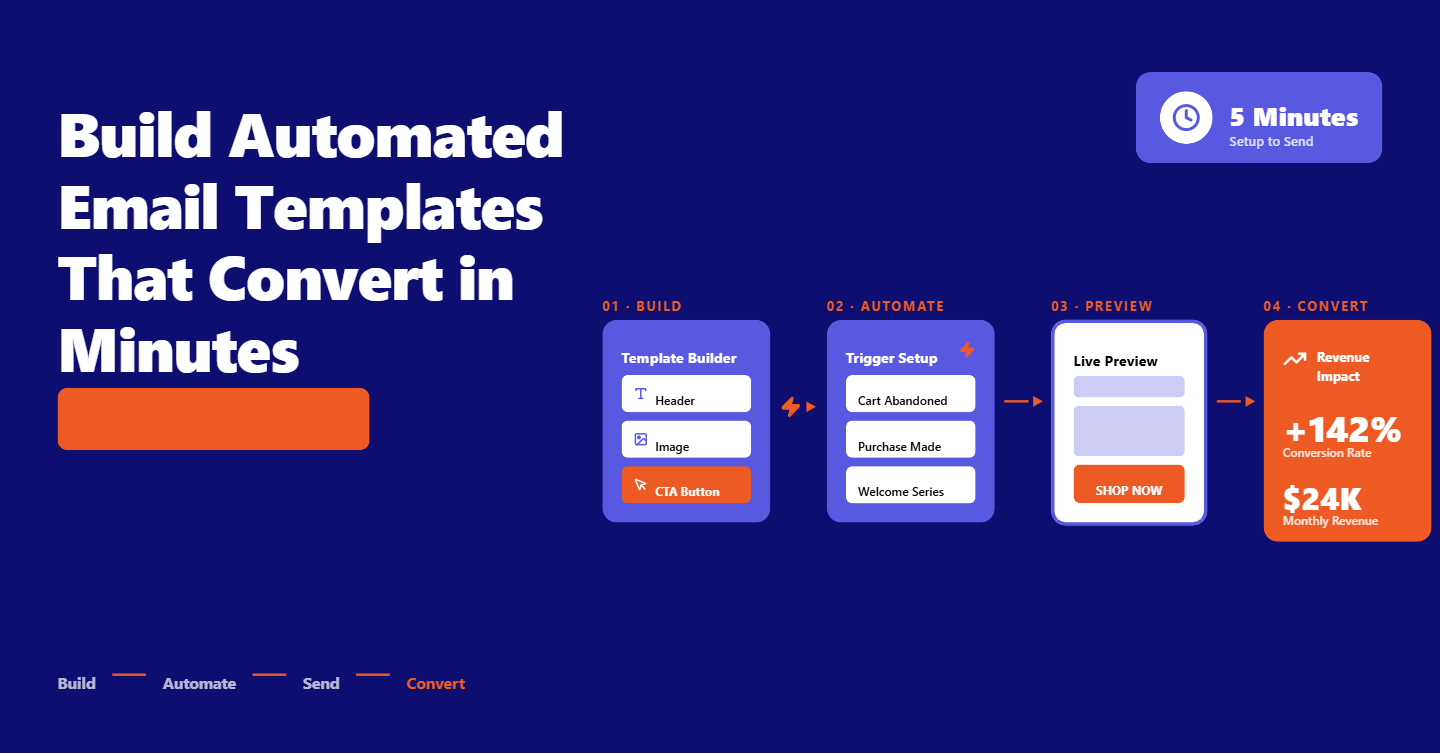
Open the TargetBay Email & SMS app and navigate to Email Templates in the left menu.
Choose a starter layout or begin blank. Add your brand colors, logo, fonts, and default footer once so every automated email sample inherits your style.
Place a Heading block where your subject-equivalent headline should go.
Enter your context and click Get Suggestions to generate options.
Choose the tone, friendly, persuasive, or urgent, and refresh to explore alternatives until one aligns with your offer.
Drag a Text block into the body. Paste your draft or a few bullet points, then select Smart Text to expand, summarize, or rewrite.
The AI text generator returns on-brand copy tuned to your tone and audience, which you can edit in line before inserting.
Add an Image block for your hero. Click Generate Image, describe the product or scene, and pick a style that matches your brand.
TargetBay’s AI image generator offers ready-to-use options and lets you regenerate until you find a perfect fit.
Always include alt text that describes the image for accessibility.
Drop a Button block for your CTA. Use the AI CTA generator by typing your desired action, like “finish checkout,” “claim discount,” or “track package.”
Select a tone, compare suggestions, and insert the best-performing phrasing. Keep link tracking on so revenue per send and click-throughs are attributed correctly.
Once your core blocks are set, wire in personalization tokens such as first name, loyalty balance, last browsed category, or recommended products.
Add dynamic sections that show different content by segment or trigger. Save your automated email template so your entire team can reuse it for campaigns and flows without reinventing the wheel.
Best Practices to Scale Quality and Conversions
Start with segmentation. Separate new subscribers from active buyers, VIPs, and win-back audiences.
Use behavior-based triggers so messages land when intent is highest. Respect quiet hours and local time zones to avoid waking customers at 2 a.m.
Design mobile-first. Most e-commerce opens happen on phones, so keep copy scannable, buttons large and tappable, and images compressed.
Test across popular clients and dark mode to avoid surprises.
Make your sender name human and recognizable. Pair it with a benefit-led preheader so the inbox preview tells a complete story.
Set realistic frequency caps and suppress unengaged contacts to safeguard deliverability.
Set up dynamic blocks for cross-sells and recommendations.
Swap content by inventory, location, and lifecycle stage. Connect loyalty data from TargetBay Rewards to highlight points and status for extra motivation without extra production time.
A Repeatable Optimization Workflow
Test one variable at a time. A/B test subject lines using different angles, lengths, or emojis.
Then test CTAs with verbs that reflect customer intent. Log results and promote winners to your default template.
Track open rate, click-through rate, and revenue per send to understand performance by flow and segment.
Evaluate spam complaints and unsubscribes to spot fatigue. When metrics dip, refresh headlines, simplify layout, or adjust send times.
Protect deliverability with regular checks. Authenticate domains with SPF, DKIM, and ideally DMARC.
Run spam tests before big sends, prune hard bounces and chronic non-openers, and avoid spammy language.
A reliable framework plus good list hygiene shields your sender reputation.
More Email Template Resources for You
Automated Email Samples You Can Copy
Order Notification Template
Subject: Your order is confirmed—here’s what happens next
Preheader: We’ll send tracking details as soon as your package ships.
Headline: Thanks for your order, {{first_name}}
Body: We’re getting your items ready. Your order {{order_number}} will ship in 1–2 business days. You can track progress anytime from your account. Meanwhile, here are care tips and accessories customers love.
CTA: Track Your Order
Secondary Note: Questions? Reply to this email, and our team will help.
This automated email notification template blends reassurance with a subtle cross-sell and keeps support options obvious.
Support Acknowledgement Template
Subject: We received your request—ticket {{ticket_number}}
Preheader: Our team will reply within {{sla_timeframe}}.
Headline: We’re on it
Body: Hi {{first_name}}, thanks for reaching out. Your request is logged under {{ticket_number}}. Our support hours are {{hours}} and the average reply time is {{sla_timeframe}}. In the meantime, these resources may help: {{top_faq_links}}.
CTA: View Your Ticket
Closing: If your issue is urgent, reply with “URGENT” in the subject and we’ll prioritize it.
This automated email acknowledgement template reduces uncertainty and deflects repeated questions with clear next steps.
Automated Reply/Out-of-Office for Peak Seasons
Subject: We’re experiencing higher-than-normal volume
Preheader: Expect replies within {{updated_sla}}—thanks for your patience.
Headline: Thanks for contacting {{brand_name}}
Body: Hi {{first_name}}, we’re thrilled by the holiday rush and currently responding within {{updated_sla}}. Your message is received and queued. For order status, use the link below to get real-time updates.
CTA: Check Order Status
Footer Note: If you’re an employee or partner, our automated email template in Outlook handles internal out-of-office replies. Customers will always get updates through our e-commerce system for accurate tracking.
This automated reply email template sets expectations without stopping the conversation and separates internal OOO from customer-facing automations.
Conclusion
Templates turn email from a time sink into a scalable revenue engine.
By standardizing structure, wiring in personalization, and letting AI accelerate creative work, your team can build an automated email template library that consistently converts.
With TargetBay Email & SMS, you get AI that builds your email template inside an ecommerce-focused platform, so you ship polished emails faster and measure impact in real time.
Pair your flows with TargetBay Reviews to amplify social proof and TargetBay Rewards to boost repeat purchases, and your lifecycle program compounds returns month after month.